Social sharing plugin with share buttons for Facebook, X (Twitter), LinkedIn and more. Includes Click to Tweet feature.
★ 4.2/5 (59)10,000+ active installations
- Version
- 1.4.2
- WordPress
- 4.6+
- PHP
- 5.2.4+
- Updated
- 27 Jan 2026
View plugin details ↗AIOSEO is the WordPress SEO plugin. Boost SEO rankings with AI SEO tools, schema, meta descriptions, XML sitemaps & rank tracking.
★ 4.7/5 (5,247)2,000,000+ active installations
- Version
- 5.0.6.1
- WordPress
- 5.7+
- PHP
- 7.4+
- Updated
- 25 Nov 2026
View plugin details ↗Automatically share your WordPress posts on multiple social networks like Facebook, X (Twitter), LinkedIn, Instagram and more.
★ 4.0/5 (556)20,000+ active installations
- Version
- 9.4.6
- WordPress
- 4.7+
- PHP
- 7.4+
- Updated
- 15 Nov 2026
View plugin details ↗Awesome Share Button
★ 4.1/5 (17)1,000+ active installations
- Version
- 2.1.14
- WordPress
- 4.1+
- Updated
- 8 Jun 2026
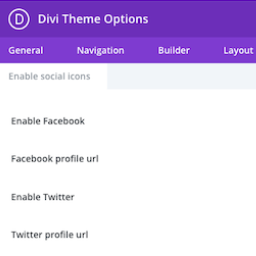
View plugin details ↗This plugin adds the ability to add more social icons to your website when using the Divi theme.
★ 5.0/5 (4)1,000+ active installations
- Version
- 1.8.1
- WordPress
- 5.1+
- PHP
- 5.4+
- Updated
- 7 May 2026
View plugin details ↗Add lightweight social share buttons to WordPress posts and pages. Gutenberg-native, fully customizable, with shortcode support and share themes.
★ 4.3/5 (3)2,000+ active installations
- Version
- 2.5.0
- WordPress
- 6.5+
- PHP
- 7.4+
- Updated
- 26 Nov 2026
View plugin details ↗Instagram feed plugin for WordPress: Display your Instagram photos, videos & reels. Easy setup with Gutenberg block, widget, shortcode & Elementor
★ 4.3/5 (52)50,000+ active installations
- Version
- 2.5.1
- WordPress
- 6.5+
- PHP
- 7.4+
- Updated
- 26 Nov 2026
View plugin details ↗Share your posts and pages quickly and easily with Cresta Social Share Counter and show share counts.
★ 4.8/5 (55)2,000+ active installations
- Version
- 2.9.9.7
- WordPress
- 4.2+
- Updated
- 21 Feb 2026
View plugin details ↗Lightweight SEO assistant for meta tags, schema and structured data, XML sitemaps, Open Graph previews, robots.txt, and Search Console.
★ 4.8/5 (57)300,000+ active installations
- Version
- 1.11.2
- WordPress
- 6.7+
- PHP
- 7.4+
- Updated
- 23 Nov 2026
View plugin details ↗Facebook Feed Widgets. Display your Facebook feed on your website to increase engagement, sales and SEO.
★ 5.0/5 (2)600+ active installations
- Version
- 1.8.4
- WordPress
- 6.2+
- PHP
- 7.2+
- Updated
- 19 Nov 2026
View plugin details ↗Google Reviews Widget for WordPress. Display Google reviews in 1 minute with 45 professional layouts. Build trust, boost SEO, and increase sales.
★ 4.9/5 (2,680)1,000,000+ active installations
- Version
- 15.0
- WordPress
- 6.2+
- PHP
- 7.2+
- Updated
- 12 Nov 2026
View plugin details ↗Translate your site visually, directly from the front-end. Go multilingual in minutes using automatic AI translation. Works with any theme or plugin.
★ 4.7/5 (1,673)400,000+ active installations
- Version
- 3.4.1
- WordPress
- 3.1.0+
- PHP
- 7.4+
- Updated
- 24 Nov 2026
View plugin details ↗