

Automatically generate alt text for images using AI technology to improve WordPress website accessibility and SEO.
★ 3.0/5 (2)20+ active installations
- Version
- 1.8.7
- WordPress
- 5.7+
- PHP
- 5.6+
- Updated
- 27 May 2026
WORDPRESS RESOURCES
Explore public plugin information from the official WordPress.org directory. Compare what a plugin does, its requirements and update history before adding it to your website.
Explore WordPress hosting →7,640 matching plugins reported by WordPress.org · Page 30 of 50
Source: WordPress.org
Data refreshed 21 Nov 2026 07:54 UTC
Automatically generate alt text for images using AI technology to improve WordPress website accessibility and SEO.
Bulk edit WooCommerce prices, stock and product details in a spreadsheet. Preview changes before saving, then undo a job, product or field.

By Easy Appointments
The easiest free WordPress booking plugin. Create beautiful appointment booking forms with flexible scheduling and email notifications.

By cleverplugins
Google Search Console in WordPress: keyword insights, on-page SEO, internal links. AI via WordPress Connectors or SEO Booster Credits.

By Smackcoders Inc.,
The best WordPress Import Export plugin. Easily import and export posts, pages, CPTs, WooCommerce products, users and more using CSV, XML and Excel.

By WP Compress
Install, activate and connect WP Compress across all of your MainWP Child Sites.

By brightvesseldev
Ultimate Pre-Orders Plugin for WooCommerce.

By David Anderson / Team Updraft
Improve your SEO and your user experience through internal linkbuilding. Automated links between your posts based on a smart keyword configuration.
Search Pixabay and Unsplash images, set automatic featured images, and generate AI images for WordPress posts.

By Alisha Thomas
A modern "2-in-1" save button for the classic AND block editor: save the post and instantly go to your next action.

By WPClever
WPC Variation Swatches is a beautiful color, image, radio and buttons variation swatches for WooCommerce product attributes.
By scribu
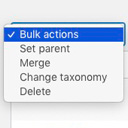
Allows you to merge terms, move terms between taxonomies, and set term parents, individually or in bulk.
CHOOSE WHAT YOUR WEBSITE NEEDS
Start with the task you need to solve. Compare features, WordPress and PHP requirements, update history and the author’s documentation. Test changes on a private copy and avoid adding several plugins for the same job.
This independent directory displays plugin information on WebFulHost and links to the official source. Packages are not mirrored or installed here. A plugin can include paid extensions or services with separate terms from its author.

