QuickSwish is an ultimate and exclusive WooCommerce plugin that allows you to create stunning quickview button for your WooCommerce store.
★ 5.0/5 (2)300+ active installations
- Version
- 1.1.3
- WordPress
- 5.0+
- Updated
- 30 Aug 2026
View plugin details ↗Send SMS notifications, OTP login and 2FA codes, and WooCommerce order SMS from WordPress through 260+ SMS gateways.
★ 4.1/5 (107)7,000+ active installations
- Version
- 7.2.15
- WordPress
- 4.1+
- PHP
- 7.4+
- Updated
- 20 Nov 2026
View plugin details ↗Security and anti-spam without CAPTCHA. Blocks bots on forms, comments and logins, limits login attempts and hardens WordPress. No outside service.
★ 4.6/5 (213)10,000+ active installations
- Version
- 3.7.0
- WordPress
- 6.5+
- PHP
- 7.4+
- Updated
- 14 Nov 2026
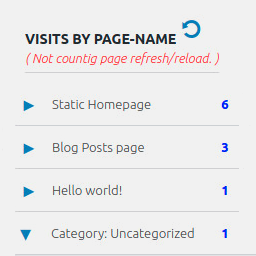
View plugin details ↗Display number of visits for each page in admin dashboard and browser developer-tool/console. Doesn't count page refresh as a new visit...
★ 4.0/5 (7)5,000+ active installations
- Version
- 2.0.5
- WordPress
- 6.5+
- PHP
- 5.6.40+
- Updated
- 14 Sep 2026
View plugin details ↗Cookie consent banner with real browser scanning, script blocking, Google Consent Mode, GDPR/CCPA consent logs, and a cookie policy page.
★ 4.9/5 (26)80,000+ active installations
- Version
- 1.9.0
- WordPress
- 6.7+
- PHP
- 7.4+
- Updated
- 19 Nov 2026
View plugin details ↗The one-stop platform for even stronger customer relations. Bolster your customer support with its live chat, chatbot, and knowledge base software.
★ 5.0/5 (6)2,000+ active installations
- Version
- 2.0.14
- WordPress
- 3.6+
- Updated
- 21 Aug 2026
View plugin details ↗Opt-in AI for WordPress: one stable feature plus experiments that may change or be removed. Needs an AI provider plugin and your own API key.
★ 4.2/5 (10)60,000+ active installations
- Version
- 1.5.0
- WordPress
- 7.0.3+
- PHP
- 7.4+
- Updated
- 30 Oct 2026
View plugin details ↗The #1 Hotel Booking and Vacation Rental Plugin for WordPress. Online payments, seasons, rates, free or paid extras, coupons, taxes & fees.
★ 3.7/5 (65)10,000+ active installations
- Version
- 6.5.0
- WordPress
- 6.6+
- PHP
- 7.4+
- Updated
- 18 Nov 2026
View plugin details ↗Zotpress displays your Zotero citations on WordPress.
★ 4.9/5 (66)2,000+ active installations
- Version
- 7.4.5
- WordPress
- 3.6+
- Updated
- 25 Oct 2026
View plugin details ↗Manage placeholders in WordPress content, titles, widgets, and blocks.
20+ active installations
- Version
- 1.0
- WordPress
- 5.0+
- PHP
- 7.0+
- Updated
- 22 Jul 2026
View plugin details ↗Send newsletters, automated post notifications & WooCommerce emails in WordPress. Unlimited subscribers & campaigns, opt-in forms & no SaaS fees.
★ 4.6/5 (1,170)50,000+ active installations
- Version
- 5.9.44
- WordPress
- 3.9+
- PHP
- 7.0+
- Updated
- 18 Nov 2026
View plugin details ↗Displays WordPress 5.5's environment type setting in the admin bar and the "At a Glance" dashboard widget.
★ 5.0/5 (4)1,000+ active installations
- Version
- 1.6.0
- WordPress
- 5.5+
- PHP
- 7.4+
- Updated
- 19 Dec 2025
View plugin details ↗