

Post Types Unlimited
By WPExplorer
Create unlimited custom post types and custom taxonomies.
★ 5.0/5 (9)10,000+ active installations
- Version
- 1.2.9
- WordPress
- 5.7+
- PHP
- 7.4+
- Updated
- 13 May 2026
WORDPRESS RESOURCES
Explore public plugin information from the official WordPress.org directory. Compare what a plugin does, its requirements and update history before adding it to your website.
Explore WordPress hosting →10,000 matching plugins reported by WordPress.org · Page 31 of 50
Source: WordPress.org
Data refreshed 23 Nov 2026 00:58 UTC
By WPExplorer
Create unlimited custom post types and custom taxonomies.
By Felix W.
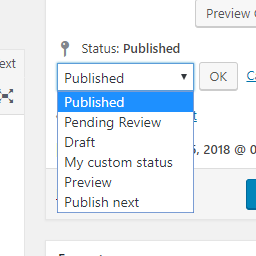
Add new statuses to all post types (posts, pages, products, ...).
Envision Page Builder makes it easy to create stunning, responsive WordPress websites with custom blocks, templates, animations, and more.

By Ben Huson
Manage page sections with nested page parts, display content across template areas, and easily duplicate pages and their child page parts.

By Cooperative IT
Display related posts, pages or CPTs by category, tag or author - or embed any single post, page or CPT anywhere on your site.

By Johan van der Wijk
This plugin enables you to edit and display Content Blocks in a sidebar widget or using a shortcode.

By Jose Mortellaro
It lets you set a custom post type as a front page.

By Marco Milesi
Easily redirect your WordPress posts to any external URL with a simple metabox. Lightweight, efficient, and perfect for SEO!
Customize your WooCommerce thank you page. Redirect customers after purchase based on products, categories, payment methods & more.
By ithemelandco
Editing Date in WordPress is very painful. Be professionals with managing data in the reliable and flexible way by Wordpress Bulk Posts Editing.

By wpdevart
Coming soon and Maintenance mode plugin is an awesome tool to show your website visitors that you are working on your website for making it better.

By andyexeter
Stop non-admin users trashing, deleting or unpublishing your site-critical posts and pages. Lock content down in seconds - no code required.
CHOOSE WHAT YOUR WEBSITE NEEDS
Start with the task you need to solve. Compare features, WordPress and PHP requirements, update history and the author’s documentation. Test changes on a private copy and avoid adding several plugins for the same job.
This independent directory displays plugin information on WebFulHost and links to the official source. Packages are not mirrored or installed here. A plugin can include paid extensions or services with separate terms from its author.

