

Use Zigpolll to add On-Site Surveys, Post Purchase Surveys, Exit Intent Surveys to your Wordpress site. Start from scratch or use our pre-built templa …
40+ active installations
- Version
- 1.1
- WordPress
- 2.8+
- PHP
- 5.2+
- Updated
- 6 May 2025
WORDPRESS RESOURCES
Explore public plugin information from the official WordPress.org directory. Compare what a plugin does, its requirements and update history before adding it to your website.
Explore WordPress hosting →721 matching plugins reported by WordPress.org · Page 32 of 50
Source: WordPress.org
Data refreshed 28 Nov 2026 21:51 UTC
Use Zigpolll to add On-Site Surveys, Post Purchase Surveys, Exit Intent Surveys to your Wordpress site. Start from scratch or use our pre-built templa …

By OpenWidget
⭐️ Embed Google reviews into your WordPress site. Improve trust, sales & SEO of your Wordpress site with Google reviews.

By miniOrange
NFT Marketplace helps you mint and sell NFTs on your WordPress site and earn royalties out of them after reselling.
Boost Audience Engagement with Award Winning Speed Optimized Social Tools: Share Buttons, Related Posts, Monetization & Google Analytics.

By onchat
Boost your sales with an AI chatbot for customer support on your Wordpress website or WooCommerce online store.
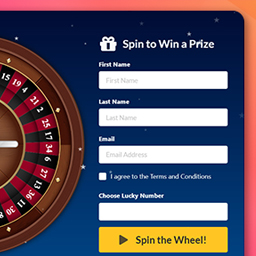
Engage visitors, converting valuable traffic into buyers & subscribers. Visitors spin the wheel, win an auto-generated coupon or prize and have a …

By Autonify AI
Turn store visitors into buyers with an AI sales and support agent for WooCommerce that answers questions and surfaces missing revenue.

By Exei
The Exei AI-Chatbot plugin adds an AI Chatbot to WordPress, boosting engagement, generating leads, and offering 24/7 instant support.

By Hibiscus Technolab
Hibiscus Instant Chat — Turn your website visitors into instant conversations with a simple and customizable chat widget.

By woosmap
Easily integrate the Woosmap Store Locator Widget into your WordPress site with this Gutenberg block plugin.

By SunCart
Track and display WooCommerce product price history using charts and tables to inform and engage your customers.

By teamzt
The smart agreements plugin helps to create a agreement/contract and digital signature
CHOOSE WHAT YOUR WEBSITE NEEDS
Start with the task you need to solve. Compare features, WordPress and PHP requirements, update history and the author’s documentation. Test changes on a private copy and avoid adding several plugins for the same job.
This independent directory displays plugin information on WebFulHost and links to the official source. Packages are not mirrored or installed here. A plugin can include paid extensions or services with separate terms from its author.
