Create realistic, simplified 3D world maps with interactive elements, offering users an engaging, hands-on experience with globe maps.
★ 5.0/5 (4)400+ active installations
- Version
- 2.0.1
- WordPress
- 5.0+
- PHP
- 7.0+
- Updated
- 6 Feb 2026
View plugin details ↗Create accessible contact forms with drag-and-drop. WCAG 2.2 compliant with screen reader support, keyboard navigation, and clear error messages.
★ 4.4/5 (17)700+ active installations
- Version
- 2.3.40
- WordPress
- 5.9+
- PHP
- 7.4+
- Updated
- 25 Nov 2026
View plugin details ↗Real-time identification of residential and commercial address types.
★ 2.0/5 (1)200+ active installations
- Version
- 2.5.13
- WordPress
- 6.4+
- Updated
- 25 Aug 2026
View plugin details ↗This module allows you to export all WooCommerce orders as invoices in Contasimple.
★ 4.0/5 (6)200+ active installations
- Version
- 1.32.0
- WordPress
- 3.8+
- PHP
- 5.5+
- Updated
- 1 Oct 2026
View plugin details ↗DirectoryPress is most advanced and flexible directory listing plugin with wide range of features, You can build a business directory, classified list …
★ 3.0/5 (2)600+ active installations
- Version
- 3.6.28
- WordPress
- 6.0+
- Updated
- 25 Nov 2026
View plugin details ↗Turn Contact Form 7 into an AI auto responder. Send personalized OpenAI email replies automatically or after manual approval.
30+ active installations
- Version
- 1.2.0
- WordPress
- 5.8+
- PHP
- 7.4+
- Updated
- 27 Nov 2026
View plugin details ↗Add free giveaways to your WordPress site. Build contests in the Rewards Fuel dashboard, then embed them with a shortcode or block.
★ 4.4/5 (65)30+ active installations
- Version
- 3.3.0
- WordPress
- 5.8+
- PHP
- 7.4+
- Updated
- 18 Nov 2026
View plugin details ↗Two-factor authentication, passkeys, social login, magic login, limit login attempts, file change scanning and audit logs for WordPress.
★ 4.2/5 (36)10,000+ active installations
- Version
- 3.2.0
- WordPress
- 5.0+
- PHP
- 7.3+
- Updated
- 28 Nov 2026
View plugin details ↗Eliminate fraud & verify customer age with real ID checks
★ 5.0/5 (12)100+ active installations
- Version
- 1.40.11
- WordPress
- 5.8+
- PHP
- 7.4+
- Updated
- 16 Nov 2026
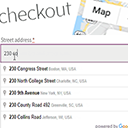
View plugin details ↗Improve your WooCommerce checkout flow with Google Places address autocomplete, geocoding, and location picker tools. Supports Classic Checkout and Ch …
★ 4.5/5 (11)1,000+ active installations
- Version
- 1.2.2
- WordPress
- 4.5+
- PHP
- 5.6+
- Updated
- 27 Nov 2025
View plugin details ↗Accept payments in WooCommerce with a reliable and secure Scandinavian payment gateway.
★ 5.0/5 (1)200+ active installations
- Version
- 2.10.0
- WordPress
- 4.7+
- PHP
- 7.4+
- Updated
- 4 Oct 2026
View plugin details ↗AI bot protection through invisible trap link mazes — hidden links lure bots into a maze of fake content for detection and blocking.
★ 5.0/5 (1)60+ active installations
- Version
- 1.6.3
- WordPress
- 6.9+
- PHP
- 8.2+
- Updated
- 18 Nov 2026
View plugin details ↗