Intercepts image paste and drop in Gutenberg, converts them to WebP/PNG or keeps original formats, and inserts them into posts.
★ 5.0/5 (1)0+ active installations
- Version
- 1.0.3
- WordPress
- 6.0+
- PHP
- 7.4+
- Updated
- 23 Aug 2026
View plugin details ↗Automatically trims, resizes, and pads WooCommerce product images onto a consistent branded canvas background as soon as they're uploaded.
10+ active installations
- Version
- 1.4.0
- WordPress
- 6.0+
- PHP
- 7.4+
- Updated
- 26 Oct 2026
View plugin details ↗Sell event tickets with WooCommerce. Event registration, recurring events, RSVP, attendee management & event calendar — free.
★ 4.5/5 (167)6,000+ active installations
- Version
- 5.7.16
- WordPress
- 5.3+
- PHP
- 7.4+
- Updated
- 19 Nov 2026
View plugin details ↗Create classic polls and advanced polls with dependant questions. Voting / survey system.
★ 2.6/5 (5)400+ active installations
- Version
- 1.0.85
- WordPress
- 3.0.5+
- Updated
- 17 Aug 2026
View plugin details ↗Advanced ACF fields with built-in layouts. Works with free ACF! Gallery & Repeater fields with masonry, carousel, lightbox & more.
700+ active installations
- Version
- 2.1.6
- WordPress
- 5.8+
- PHP
- 7.4+
- Updated
- 5 Sep 2026
View plugin details ↗Collect, manage, and display powerful product reviews and testimonials for WooCommerce stores. Boost trust and conversion with automated review collec …
★ 5.0/5 (34)900+ active installations
- Version
- 3.9
- WordPress
- 5.6+
- PHP
- 7.4+
- Updated
- 21 Oct 2026
View plugin details ↗Correct the file your pages already use. Keep the same attachment, its descriptive text and WordPress media relationships.
100+ active installations
- Version
- 1.8.2
- WordPress
- 5.7+
- PHP
- 7.4+
- Updated
- 16 Sep 2026
View plugin details ↗Enhance your website with UiCore Elements – a free plugin offering diverse widgets for effortless design enrichment.
40,000+ active installations
- Version
- 1.3.19
- WordPress
- 4.6+
- PHP
- 7.4+
- Updated
- 10 Nov 2026
View plugin details ↗Make your site faster and more secure with the click of a few buttons
★ 3.1/5 (43)60,000+ active installations
- Version
- 3.0.13
- PHP
- 7.0+
- Updated
- 10 Feb 2025
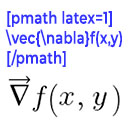
View plugin details ↗Render mathematical equations in WordPress as PNG images using pmath native syntax or LaTeX input with server-side rendering.
★ 4.2/5 (5)300+ active installations
- Version
- 3.0.5
- WordPress
- 5.0+
- PHP
- 7.2+
- Updated
- 9 May 2026
View plugin details ↗Import images from Google Drive into WordPress Media Library using a secure service account. Batch import, WebP conversion, and auto alt text.
10+ active installations
- Version
- 3.0.0
- WordPress
- 5.6+
- PHP
- 7.2+
- Updated
- 23 Sep 2026
View plugin details ↗