Organize WordPress content into responsive tabbed sections with a Gutenberg block – multiple themes, icons, shortcodes, and advanced tab layouts.
★ 5.0/5 (1)700+ active installations
- Version
- 1.2.2
- WordPress
- 6.5+
- PHP
- 7.2+
- Updated
- 26 Jul 2026
WORDPRESS RESOURCES
Explore public plugin information from the official WordPress.org directory. Compare what a plugin does, its requirements and update history before adding it to your website.
Explore WordPress hosting →3,939 matching plugins reported by WordPress.org · Page 34 of 50
Source: WordPress.org
Data refreshed 25 Nov 2026 03:21 UTC
Organize WordPress content into responsive tabbed sections with a Gutenberg block – multiple themes, icons, shortcodes, and advanced tab layouts.

By WPDeveloper
Put Spotlight On News, Announcements & Let The Visitors Find It Easily

By veks
A version of your site for the visually impaired: a settings panel, Gutenberg blocks, a shortcode and a widget.
Display WooCommerce Popular Products in your website post or pages .
Embed SoundCloud tracks, playlists, and profiles in WordPress with a customizable Gutenberg player block – colors, artwork, and more.
By Tauhidpro
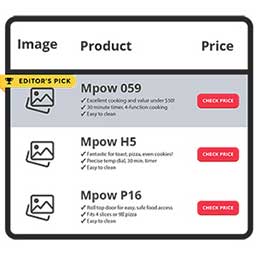
NicheTable is a simple and flexible table block plugin for the WordPress block editor. It allows you to create responsive product comparison tables …
Photo Gallery is a powerful image gallery plugin with a list of advanced options for creating responsive image galleries with beautiful lightbox.

By Saad Iqbal
Password protect your WordPress site with one password. Control access, whitelist trusted IPs, and monitor password activity.

By BeRocket
Fast and flexible AJAX product filters for WooCommerce. Filter by categories, attributes, price, tags, rating, and more. No page reloads.
Organize thousands of WordPress media files in folders / categories with ease.

Protect your WordPress website from brute force attacks by limiting the number of failed login attempts. Improve security and stop bots.

By WP Company
The Media Focus Point Plugin ensures the key area of an image or video stays visible, regardless of resizing or layout changes.
CHOOSE WHAT YOUR WEBSITE NEEDS
Start with the task you need to solve. Compare features, WordPress and PHP requirements, update history and the author’s documentation. Test changes on a private copy and avoid adding several plugins for the same job.
This independent directory displays plugin information on WebFulHost and links to the official source. Packages are not mirrored or installed here. A plugin can include paid extensions or services with separate terms from its author.