

Adds a "Collections" taxonomy to WooCommerce, working exactly like Product Categories.
10+ active installations
- Version
- 1.3.1
- WordPress
- 5.8+
- PHP
- 7.4+
- Updated
- 25 Nov 2026
WORDPRESS RESOURCES
Explore public plugin information from the official WordPress.org directory. Compare what a plugin does, its requirements and update history before adding it to your website.
Explore WordPress hosting →921 matching plugins reported by WordPress.org · Page 35 of 50
Source: WordPress.org
Data refreshed 25 Nov 2026 19:37 UTC
Adds a "Collections" taxonomy to WooCommerce, working exactly like Product Categories.

By InsertCart
Add optional checkbox and radio services to WooCommerce products, with per-unit prices and service details in the cart and orders.
Add a Buy Now button, direct checkout, side cart and quick view to WooCommerce. Skip the cart page and cut cart abandonment. No code needed.

By Rajan Vijayan
Wishlists for WooCommerce and any post type: several named lists, guest wishlists, share links and gift lists. Formerly WP Smart Wishlist. Free.

By WPClever
Suggest additional products and offer discounts to customers on the checkout page with flexible and smart conditions.

By Rehan Adil
Enhance WooCommerce coupons with advanced features: cart-based rules, BOGO deals, scheduling, URL coupons, auto-apply logic, and more.

By gmscreativo
Sell digital gift cards in WooCommerce with recipient emails, a customer wallet, partial spending, and a live balance near the cart.

By Velop Media
Add written greeting cards, personal video, and voice GiftNotes to WooCommerce gift orders.
By ProPluginsLab
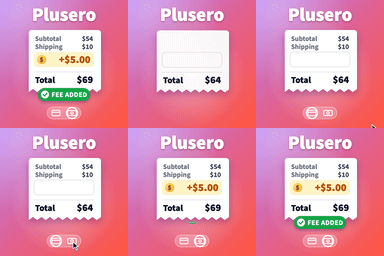
Add conditional extra fees to WooCommerce. Charge per product, per cart, at checkout, by shipping method or by payment gateway.

By OptiMonk Popup Creators
Chat with an AI agent to build fully custom, on-brand popups. No templates. No designers.

By Code Craft
WooCommerce gift cards made simple: sell digital gift cards by email that recipients redeem in the normal coupon field, with balances kept per card.

By Mutt Group / Mutt Studio
Give free products with a WooCommerce coupon. The gifts are added to the cart automatically when the customer applies the coupon.
CHOOSE WHAT YOUR WEBSITE NEEDS
Start with the task you need to solve. Compare features, WordPress and PHP requirements, update history and the author’s documentation. Test changes on a private copy and avoid adding several plugins for the same job.
This independent directory displays plugin information on WebFulHost and links to the official source. Packages are not mirrored or installed here. A plugin can include paid extensions or services with separate terms from its author.
