
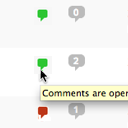
One Click Close Comments
By Scott Reilly
Conveniently close or open comments for a post or page with one click from the admin listing of posts.
★ 4.9/5 (10)5,000+ active installations
- Version
- 3.0
- WordPress
- 4.7+
- Updated
- 17 Apr 2025
WORDPRESS RESOURCES
Explore public plugin information from the official WordPress.org directory. Compare what a plugin does, its requirements and update history before adding it to your website.
Explore WordPress hosting →3,037 matching plugins reported by WordPress.org · Page 37 of 50
Source: WordPress.org
Data refreshed 28 Nov 2026 15:40 UTC
By Scott Reilly
Conveniently close or open comments for a post or page with one click from the admin listing of posts.

By Genoo
Combine the flexibility of WordPress with the power of Genoo and experience amazing results!

By pluginsware
Build any kind of directory site: classifieds, cars, bikes & other vehicles dealers site, pets, real estate portal, yellow pages, etc...

By Omnisend
Email Marketing, Newsletter, Email Automation, Forms, Pop Up, SMS, Abandoned Cart made easy for WordPress & WooCommerce by Omnisend

By Daniel Esparza
Real-time AJAX search. Choose in the admin which post types appear in the results. Shortcode: [all-post-type-ajax-search]

By Naked Cat Plugins
Create manual, phone, POS, or email orders in WooCommerce. Shop admins and staff can place customer orders directly from the frontend checkout.

By Bowo
Inspect PHP variables on a central dashboard in wp-admin for convenient debugging.

By Whistleblowing Form Team
Build WooCommerce product, cart, checkout, order confirmation, mini cart, and My Account layouts with Elementor.

By AsanaPlugins
WooCommerce Product Bundle help to creates Product Bundles, Composite Products, Mix and Match, BOGO deals, Offer gift products, and Assembled Products …

By NETT.PRO
Measures changes in WordPress memory usage. This tool helps you to reveal plugins that are poorly programmed and do not release memory properly.

By apasionados
Lead info with country for Contact Form 7 helps to track users that fill in forms.

By WPClever
WPC Price by User Role helps you configure discounts and adjust prices in bulk based on user roles.
CHOOSE WHAT YOUR WEBSITE NEEDS
Start with the task you need to solve. Compare features, WordPress and PHP requirements, update history and the author’s documentation. Test changes on a private copy and avoid adding several plugins for the same job.
This independent directory displays plugin information on WebFulHost and links to the official source. Packages are not mirrored or installed here. A plugin can include paid extensions or services with separate terms from its author.