MaxGalleria
By maxfoundry
Responsive WordPress Gallery plugin with built in Slider and Lightbox
★ 4.4/5 (65)1,000+ active installations
- Version
- 6.5.5
- WordPress
- 3.9+
- Updated
- 12 Nov 2026
WORDPRESS RESOURCES
Explore public plugin information from the official WordPress.org directory. Compare what a plugin does, its requirements and update history before adding it to your website.
Explore WordPress hosting →2,288 matching plugins reported by WordPress.org · Page 37 of 50
Source: WordPress.org
Data refreshed 24 Nov 2026 11:03 UTC
By maxfoundry
Responsive WordPress Gallery plugin with built in Slider and Lightbox

By codepeople
Easily create contact forms with integrated PayPal payments. Accept service payments, orders, and more with a drag-and-drop form builder.
Secure, control and customize WordPress with modular admin tools, access controls, 2FA, Firewall protection, activity monitoring, and more.

By IT Path Solutions
Change WordPress login URL, create role-based login URLs, customize login screen, manage admin accounts, and enable security hardening features.

By Codenix
This is a great plugin for securing your WordPress Site. Easily set passwords to restrict access to the site and WooCommerce products.
By Graham
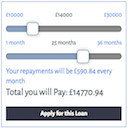
A simple repayment calculator. Uses sliders to set the amount and term and displays a range of outputs

By Fahad Mahmood
Display products from your Shopify store on your WordPress website using shortcodes. Fast, cached and secure.
Bulk and quantity discounts, wholesale and B2B prices, and cart rules for WooCommerce. Show tiered prices as tables, blocks or options.
Restaurant reservations under your brand: booking widget, floor plan, WhatsApp & SMS reminders, 0% commission. White label for agencies & groups.
Photo Gallery is a cool responsive image gallery plugin with beautiful views
A store editor plugin for editing all WooCommerce store and product pages, cart, checkout and user account pages, all within the WordPress Customizer

By Weblizar - WordPress Themes & Plugin
Pin Your Images With weblizar pin it button on image hover and post.
CHOOSE WHAT YOUR WEBSITE NEEDS
Start with the task you need to solve. Compare features, WordPress and PHP requirements, update history and the author’s documentation. Test changes on a private copy and avoid adding several plugins for the same job.
This independent directory displays plugin information on WebFulHost and links to the official source. Packages are not mirrored or installed here. A plugin can include paid extensions or services with separate terms from its author.