

Restrict products by country for WooCommerce. Hide products by country, geolocate your store, and create country catalogs for WooCommerce.
★ 4.7/5 (15)200+ active installations
- Version
- 1.15.5
- WordPress
- 3.6+
- Updated
- 20 Oct 2026
WORDPRESS RESOURCES
Explore public plugin information from the official WordPress.org directory. Compare what a plugin does, its requirements and update history before adding it to your website.
Explore WordPress hosting →2,085 matching plugins reported by WordPress.org · Page 38 of 50
Source: WordPress.org
Data refreshed 22 Nov 2026 18:04 UTC
Restrict products by country for WooCommerce. Hide products by country, geolocate your store, and create country catalogs for WooCommerce.
Create responsive Elementor sliders for hero sections, posts, products and more with powerful Elementor addons and ready-to-use Elementor templates.
WooCommerce funnel builder to create custom checkout pages, sales funnels, one-click upsells, and order bumps - all inside WordPress.
Send SMS notifications, OTP login and 2FA codes, and WooCommerce order SMS from WordPress through 260+ SMS gateways.

By artiosmedia
This plugin will allow a user to add up to two additional internal product identifiers to the order process in addition to the GTIN, EAN, SKU, or UPC.

By codeatoz
CodeAtoZ – Hide Price for Stores gives WooCommerce store owners complete control over price visibility — for B2B, wholesale, members-only, catalog-mod …

By Mauriac AZOUA
Display variations as single product or show variations dropdown on shop and category page.
By M Sohaib Qayyum
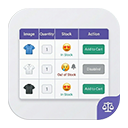
Display WooCommerce product variations in a beautiful, searchable and filterable table with advanced styling options.
Google Analytics alternative with live visitors, journeys, heatmaps, Search Console and WooCommerce analytics. Free plan, 7-day Pro trial.

By uxheart
Remove all items from the cart page with a single click - No Bloat & Zero Impact Code 🚀

By Nasir Uddin
Generic Elements is the most complete elementor design toolkit which enhanced the power of elementor plugin.

By webbykey
Customize the Add to Cart button text, color, size, and other styles for different products. Add a floated or sticky Add to Cart button on the screen
CHOOSE WHAT YOUR WEBSITE NEEDS
Start with the task you need to solve. Compare features, WordPress and PHP requirements, update history and the author’s documentation. Test changes on a private copy and avoid adding several plugins for the same job.
This independent directory displays plugin information on WebFulHost and links to the official source. Packages are not mirrored or installed here. A plugin can include paid extensions or services with separate terms from its author.



