Build perfect popups in minutes. Modern, responsive templates and simple setup. Age verify compatible option.
★ 4.0/5 (1)300+ active installations
- Version
- 2.2.1
- WordPress
- 4.6+
- PHP
- 5.6+
- Updated
- 14 Oct 2026
View plugin details ↗The best BuddyPress plugin for building online communities, user profile, social networks, and membership sites on WordPress with tons of features.
★ 4.8/5 (194)4,000+ active installations
- Version
- 1.3.7
- WordPress
- 4.9+
- PHP
- 5.6+
- Updated
- 15 Mar 2026
View plugin details ↗Convenient cloud-based localization and translation for WordPress.
★ 2.6/5 (48)7,000+ active installations
- Version
- 1.7.5
- WordPress
- 6.5+
- PHP
- 7.4+
- Updated
- 28 Oct 2026
View plugin details ↗Inline visual translator for WordPress with multi-language support, media translation, SEO URLs, and high-performance JSON caching.
★ 5.0/5 (5)30+ active installations
- Version
- 2.2.1
- WordPress
- 5.0+
- PHP
- 7.4+
- Updated
- 24 Aug 2026
View plugin details ↗Create content templates for your posts and pages. When creating a new post or page use one of your content templates as the starting point!
★ 4.0/5 (24)1,000+ active installations
- Version
- 2.2.7
- WordPress
- 3.6+
- Updated
- 26 Nov 2025
View plugin details ↗Add extra product option fields (Text, Number, Select, Checkbox, Switch, Slider & more) to WooCommerce products with configurable extra prices.
100+ active installations
- Version
- 1.0.3
- WordPress
- 5.0+
- PHP
- 7.4+
- Updated
- 14 Sep 2026
View plugin details ↗Email marketing, newsletters & email automation for WordPress. Manage WooCommerce emails & build email newsletter campaigns with weMail.
★ 4.0/5 (31)9,000+ active installations
- Version
- 2.1.9
- WordPress
- 5.6+
- PHP
- 7.4+
- Updated
- 11 Nov 2026
View plugin details ↗Yuhi introduces a smarter way to manage content visibility in WordPress. Retire outdated content without breaking links or cluttering search results.
60+ active installations
- Version
- 1.3.1
- WordPress
- 6.4+
- Updated
- 2 Jun 2026
View plugin details ↗25 free Elementor widgets with Theme Builder. Build headers, footers, sliders, mega menus, and Stripe payments - no coding required.
20+ active installations
- Version
- 1.3.3
- WordPress
- 6.1+
- PHP
- 7.4+
- Updated
- 22 Sep 2026
View plugin details ↗Hide the product's price, add-to-cart button, quantity, and options on any product and order. Inject an optional message.
★ 4.6/5 (14)3,000+ active installations
- Version
- 1.2.16
- WordPress
- 5.8+
- PHP
- 7.4+
- Updated
- 4 Feb 2026
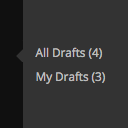
View plugin details ↗Adds links to 'All Drafts' and 'My Drafts' under Posts, Pages, and other custom post type sections in the admin menu.
★ 5.0/5 (7)400+ active installations
- Version
- 2.4
- WordPress
- 4.6+
- Updated
- 14 Apr 2025
View plugin details ↗Prevent WCAG accessibility errors in your content with real-time validation for blocks, meta fields, and document structure.
★ 5.0/5 (1)80+ active installations
- Version
- 4.2.3
- WordPress
- 6.7+
- PHP
- 7.0+
- Updated
- 17 Nov 2026
View plugin details ↗