

An HTML sitemap and post list for your readers, placed with a shortcode or block. Your XML sitemap is left untouched.
★ 5.0/5 (1)100+ active installations
- Version
- 1.0.0
- WordPress
- 6.3+
- PHP
- 7.4+
- Updated
- 21 Sep 2026
WORDPRESS RESOURCES
Explore public plugin information from the official WordPress.org directory. Compare what a plugin does, its requirements and update history before adding it to your website.
Explore WordPress hosting →2,383 matching plugins reported by WordPress.org · Page 38 of 50
Source: WordPress.org
Data refreshed 23 Nov 2026 20:52 UTC
An HTML sitemap and post list for your readers, placed with a shortcode or block. Your XML sitemap is left untouched.
Secure, control and customize WordPress with modular admin tools, access controls, 2FA, Firewall protection, activity monitoring, and more.
Keep radio, podcasts and audio playing while visitors browse. Ajax navigation turns your site into a fast single page application.

By Jose Varghese
Add a "Was this page helpful?" feedback widget to WordPress. Includes beautiful icon styles, analytics, email alerts, and GDPR tools.
Build Contact Form 7 forms by dragging and dropping fields. Add layouts, style each field, and set conditions without writing shortcodes.

By WANotifier
Send WhatsApp notifications from Contact Form 7, Gravity Forms, WPForms, and 6 more form plugins using WhatsApp Business API

By Shamalli
A WordPress directory plugin for business listings: categories, locations, fields, maps, and AI that writes the listing fields for you.

By Sheetable
Turn Google Sheets into WP tables with search & pagination. No API key needed. Ultra-lightweight.

By Prashant Baldha
Email tracking & email logging plugin. Track email opens, email clicks & email analytics for all WordPress emails, WooCommerce emails & SMTP emails.

By shahadul878
An easy way to manage common PHP INI settings and WordPress debugging constants from the WordPress admin panel.
By Ron Fredericks
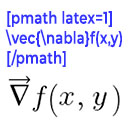
Render mathematical equations in WordPress as PNG images using pmath native syntax or LaTeX input with server-side rendering.
Import Word (.docx) and Markdown files as WordPress posts, pages or custom post types. Images, headings and tables kept. No copy-paste.
CHOOSE WHAT YOUR WEBSITE NEEDS
Start with the task you need to solve. Compare features, WordPress and PHP requirements, update history and the author’s documentation. Test changes on a private copy and avoid adding several plugins for the same job.
This independent directory displays plugin information on WebFulHost and links to the official source. Packages are not mirrored or installed here. A plugin can include paid extensions or services with separate terms from its author.



