

Free Downloads WooCommerce
By Wp Enhanced
Allow users to instantly download your free digital products without going through the checkout.
★ 4.7/5 (85)4,000+ active installations
- Version
- 3.6.6
- WordPress
- 4.4+
- PHP
- 7.4.0+
- Updated
- 28 Aug 2026
WORDPRESS RESOURCES
Explore public plugin information from the official WordPress.org directory. Compare what a plugin does, its requirements and update history before adding it to your website.
Explore WordPress hosting →3,823 matching plugins reported by WordPress.org · Page 38 of 50
Source: WordPress.org
Data refreshed 25 Nov 2026 11:17 UTC
By Wp Enhanced
Allow users to instantly download your free digital products without going through the checkout.

By Elementor
Build anything your site needs. Manage it through an agentic AI conversation inside WordPress. No setup, configuration, or code required.
A lightweight WordPress maintenance & coming soon plugin with live visual editing, modern templates, SEO protection, and zero bloat.

By Inisev
Duplicate post
Disable right click, text selection and copy paste. Content copy protection for WordPress: protect text and images, prevent copying, add watermarks.

Contact Form Builder for WordPress with payment forms, multistep forms, conversational forms, conditional logic, and integrations.

By wbcomdesigns
A modern to-do and task manager for WordPress. Every logged-in user gets a private task list they manage without page reloads.

By Robin W
For bbPress - Creates private forum groups

By WPFactory
Manage EU/ UK VAT in WooCommerce, validate VAT numbers real time with VIES, exempt or preserve VAT with various settings & cases.
By Roland Murg
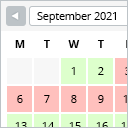
This booking calendar shows when something is booked or available. Use it to show when your holiday home is available for rent, for example.

Take control of your content. Restrict any post, page, or custom content based on user roles, login state, or custom rules. No code needed.

By Restrict
Show or hide Elementor sections, columns and widgets with ease using many different criteria
CHOOSE WHAT YOUR WEBSITE NEEDS
Start with the task you need to solve. Compare features, WordPress and PHP requirements, update history and the author’s documentation. Test changes on a private copy and avoid adding several plugins for the same job.
This independent directory displays plugin information on WebFulHost and links to the official source. Packages are not mirrored or installed here. A plugin can include paid extensions or services with separate terms from its author.

