

Powerful and comprehensive plugin that extends the functionality of Phlox Elementor theme.
★ 2.1/5 (7)80,000+ active installations
- Version
- 2.17.26
- WordPress
- 5.0+
- PHP
- 7.0+
- Updated
- 24 Nov 2026
WORDPRESS RESOURCES
Explore public plugin information from the official WordPress.org directory. Compare what a plugin does, its requirements and update history before adding it to your website.
Explore WordPress hosting →9,667 matching plugins reported by WordPress.org · Page 39 of 50
Source: WordPress.org
Data refreshed 25 Nov 2026 20:03 UTC
Powerful and comprehensive plugin that extends the functionality of Phlox Elementor theme.

By VillaTheme
Easily migrate all Shopify products and their collections(categories) to WooCommerce after several clicks

By Xfinitysoft
Set WooCommerce order limits with ease. Control min/max quantities, cart totals, category rules, user role restrictions, and checkout limit.

By kartikparmar
This easy-to-use plugin allows to create post categories in bulk and assign those categories to posts at the same time.

By AIOSEO Plugin Team
Broken link checker that finds and fixes broken links, broken images, and dead video links to protect your site's SEO.

By VillaTheme
Easily add customizable filters to WooCommerce products with Pofily. Tailor filters to customer needs for seamless product searches.

By Saiful Islam
Helps you to display your products in a searchable table layout with filters.

Build professional websites faster with ready-made pages and sections, plus flexible layout, typography, color, and spacing controls.

By Anh Tran
Create and manage custom post types and custom taxonomies with an easy-to-use UI in WordPress.

By WPClever
It helps customers compare products with mighty AJAX, doesn't require opening a new page or iframe, and allows drag-and-drop functionality.
By scribu
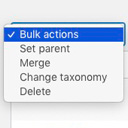
Allows you to merge terms, move terms between taxonomies, and set term parents, individually or in bulk.
Skyboot Custom Icons for Elementor expands your Elementor icons library with custom icons, perfect for website owners who use the Elementor plugin.
CHOOSE WHAT YOUR WEBSITE NEEDS
Start with the task you need to solve. Compare features, WordPress and PHP requirements, update history and the author’s documentation. Test changes on a private copy and avoid adding several plugins for the same job.
This independent directory displays plugin information on WebFulHost and links to the official source. Packages are not mirrored or installed here. A plugin can include paid extensions or services with separate terms from its author.
