Join millions who empower their websites with ElementsKit Elementor Addons. Get templates, & 100+ widgets like header-footer, mega menu, custom widget
★ 4.9/5 (2,052)1,000,000+ active installations
- Version
- 4.2.0
- WordPress
- 6.0+
- PHP
- 7.4+
- Updated
- 17 Nov 2026
View plugin details ↗Really Simple Featured Video lets you add product video & featured video to WooCommerce Products & Posts, Pages, CPTs (with featured images) a …
★ 4.0/5 (34)4,000+ active installations
- Version
- 1.5.0
- WordPress
- 6.3+
- PHP
- 8.0+
- Updated
- 16 Nov 2026
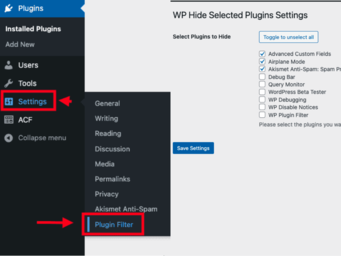
View plugin details ↗WP Plugin Filter lets you easily hide unnecessary plugins from the WordPress admin dashboard, streamlining plugin management.
★ 5.0/5 (1)20+ active installations
- Version
- 1.3.1
- WordPress
- 6.3+
- PHP
- 7.0+
- Updated
- 20 Jun 2026
View plugin details ↗Create custom post types in WordPress with custom fields, taxonomies, and meta fields. AI-powered WordPress metadata plugin.
★ 5.0/5 (1)4,000+ active installations
- Version
- 1.2.1
- WordPress
- 6.5+
- PHP
- 8.0+
- Updated
- 10 Nov 2026
View plugin details ↗
By David Anderson / Team Updraft
Redux is a simple, truly extensible, and fully responsive options framework for WordPress themes and plugins. It ships with an integrated demo.
★ 4.4/5 (273)900,000+ active installations
- Version
- 4.5.18
- WordPress
- 5.3+
- PHP
- 7.4+
- Updated
- 9 Nov 2026
View plugin details ↗Provide two widgets, showing lists of the most and reast read posts.
★ 5.0/5 (6)900+ active installations
- Version
- 2.5.21
- WordPress
- 2.9+
- PHP
- 7.4+
- Updated
- 14 Aug 2026
View plugin details ↗Add private admin notes to posts, pages, and custom post types - simple, fast, and clutter-free.
★ 5.0/5 (1)20+ active installations
- Version
- 1.2.0
- WordPress
- 6.8+
- PHP
- 8.0+
- Updated
- 15 Nov 2026
View plugin details ↗Track how many times each post is viewed and show the view count after the post content or anywhere with a shortcode.
★ 5.0/5 (2)30+ active installations
- Version
- 1.2.0
- WordPress
- 5.6+
- PHP
- 8.0+
- Updated
- 28 Oct 2026
View plugin details ↗The main advantage of this widget is random movement of random links and every time they are changing.
★ 5.0/5 (4)1,000+ active installations
- Version
- 2.6.2
- WordPress
- 4.0+
- Updated
- 16 Apr 2026
View plugin details ↗Duplicate Posts, Pages and Custom Posts easily using single click
★ 4.8/5 (469)3,000,000+ active installations
- Version
- 4.5.9
- WordPress
- 3.4+
- Updated
- 8 May 2026
View plugin details ↗Post your videos, photo galleries, slideshows, music and playlists easily and in seconds.
★ 2.8/5 (26)1,000+ active installations
- Version
- 1.165
- WordPress
- 5.0+
- Updated
- 28 Jul 2026
View plugin details ↗The PublishPress Statuses plugin allows you to create additional statuses for your posts. You can use each status to create publishing workflows.
★ 5.0/5 (4)1,000+ active installations
- Version
- 1.3.8
- WordPress
- 5.5+
- PHP
- 8.2+
- Updated
- 20 Nov 2026
View plugin details ↗