Set minimum and maximum order limits by amount, quantity, weight, volume, or dimensions in WooCommerce.
★ 4.5/5 (40)10,000+ active installations
- Version
- 4.7.4
- WordPress
- 6.1+
- Updated
- 24 Jun 2026
WORDPRESS RESOURCES
Explore public plugin information from the official WordPress.org directory. Compare what a plugin does, its requirements and update history before adding it to your website.
Explore WordPress hosting →393 matching plugins reported by WordPress.org · Page 4 of 33
Source: WordPress.org
Data refreshed 20 Nov 2026 08:49 UTC
Set minimum and maximum order limits by amount, quantity, weight, volume, or dimensions in WooCommerce.
This plugin provides a configuration to display shipping methods as Radio button or select box on the checkout page.

By WP Swings
Create WooCommerce subscriptions with recurring payments, Subscription Box features, and membership plans with flexible access rules to grow recurring …

By Eduardo Villão
MyD Delivery turns your WordPress site into a complete online delivery system — no marketplace fees, no complexity, no WooCommerce required.
COD (cash on delivery, αντικαταβολή) fee and rules for WooCommerce, plus a "Pay in store" payment method for pickup. All free.

By Brainstorm Force
1 WordPress funnel builder & WooCommerce checkout plugin. Boost AOV with one-click upsells, order bumps & high-converting checkout pages.

Translate WordPress into 110+ languages with AI. Multilingual plugin with SEO-friendly URLs, hreflang tags, language switcher, and glossary rules.

By Dotstore
Allow you to set a minimum or maximum purchase quantity for the WooCommerce store.

By Dotstore
Mass Pages/Posts Creator is a plugin which provide a simplest interface by which user can create multiple Pages/Posts at a time.

By Flexible Fees Manager
Add conditional fees to WooCommerce based on cart, products, shipping, payment methods, location, and more — without writing any code.
By ProPluginsLab
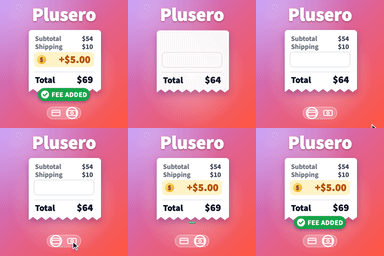
Add conditional extra fees to WooCommerce. Charge per product, per cart, at checkout, by shipping method or by payment gateway.

Add flexible conditional fees to your WooCommerce cart based on products, categories, or tags to handle custom extra charges effortlessly.
CHOOSE WHAT YOUR WEBSITE NEEDS
Start with the task you need to solve. Compare features, WordPress and PHP requirements, update history and the author’s documentation. Test changes on a private copy and avoid adding several plugins for the same job.
This independent directory displays plugin information on WebFulHost and links to the official source. Packages are not mirrored or installed here. A plugin can include paid extensions or services with separate terms from its author.