

Find and delete unused images and media files, fix broken entries, with a trash to undo anything. A lighter, faster WordPress! 💕
★ 4.6/5 (781)90,000+ active installations
- Version
- 7.3.7
- WordPress
- 6.0+
- PHP
- 8.1+
- Updated
- 10 Nov 2026
WORDPRESS RESOURCES
Explore public plugin information from the official WordPress.org directory. Compare what a plugin does, its requirements and update history before adding it to your website.
Explore WordPress hosting →5,755 matching plugins reported by WordPress.org · Page 4 of 50
Source: WordPress.org
Data refreshed 20 Nov 2026 23:05 UTC
Find and delete unused images and media files, fix broken entries, with a trash to undo anything. A lighter, faster WordPress! 💕

By Joshua David Nelson
Use an "Archived" status to unpublish content without having to trash it.

By scribu
Efficient many-to-many connections between posts, pages, custom post types, users.

By The WP Garden
Private and shared admin notes on posts, pages and custom post types. Editorial notes, team reminders and dashboard notes for WordPress teams.

By Cool Plugins
Connect Elementor forms with Google Sheets to sync form entries, or save form submissions in any post type using Elementor Pro or Hello Plus forms.
Automatically share your WordPress posts on multiple social networks like Facebook, X (Twitter), LinkedIn, Instagram and more.
Easy to show posts, pages, custom posts in customizable grid, list, slider, accordion... Available as Widgets (for Elementor), Shortcode, and Blocks.
Post and Page Builder is a standalone plugin which adds functionality to the existing TinyMCE Editor.

By andyexeter
Stop non-admin users trashing, deleting or unpublishing your site-critical posts and pages. Lock content down in seconds - no code required.
By Felix W.
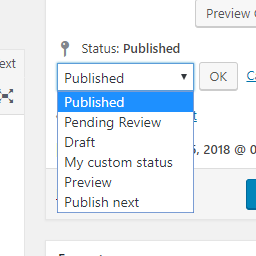
Add new statuses to all post types (posts, pages, products, ...).
Auto-publish posts, pages & CPTs, plus manage Google Business Profile posts. All from your WordPress dashboard!

By Stefano
Easily handle authors' payments on a multi-author blog by computing posts' remuneration basing on admin defined rules.
CHOOSE WHAT YOUR WEBSITE NEEDS
Start with the task you need to solve. Compare features, WordPress and PHP requirements, update history and the author’s documentation. Test changes on a private copy and avoid adding several plugins for the same job.
This independent directory displays plugin information on WebFulHost and links to the official source. Packages are not mirrored or installed here. A plugin can include paid extensions or services with separate terms from its author.



