

Organize the WordPress Media Library with unlimited media folders, subfolders, Smart Folders, and a lightweight file manager.
★ 5.0/5 (2)20+ active installations
- Version
- 1.4.1
- WordPress
- 6.2+
- PHP
- 7.4+
- Updated
- 25 Sep 2026
WORDPRESS RESOURCES
Explore public plugin information from the official WordPress.org directory. Compare what a plugin does, its requirements and update history before adding it to your website.
Explore WordPress hosting →7,197 matching plugins reported by WordPress.org · Page 4 of 50
Source: WordPress.org
Data refreshed 27 Nov 2026 18:13 UTC
Organize the WordPress Media Library with unlimited media folders, subfolders, Smart Folders, and a lightweight file manager.
Robo Gallery is a powerful image gallery and photo gallery plugin with advanced features to create responsive galleries with a beautiful lightbox
Most popular WooCommerce product feed plugin supporting Google shopping feed, meta/facebook feed, bing product feed & more.
Slider, gallery, carousel plugin for WordPress. Build your image slider, video slider, post slider, YouTube slider, or WooCommerce product slider.

By Atanas Yonkov
Reverse the post order for a specific category to be date ascending. This is a lightweight plugin that adds the option to reorder the posts from a spe …
Lens has it all: unlimited folders, drag-and-drop, role-based permissions, smart search, and more. Get organized now!

By Ivijan-Stefan Stipic
Quickly search and filter categories and taxonomies inside the WordPress admin.

By WPFactory
Add "Related categories" section to single product and/or shop pages in WooCommerce.

By David Lingren
Enhances the Media Library; powerful gallery and list shortcodes, full taxonomy support, IPTC/EXIF/XMP/PDF processing, bulk/quick edit.

By PluginEver
Showcase WooCommerce product categories in sliders, grids, or blocks with styling control, responsive layouts, and shortcode support
By Pektsekye
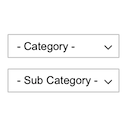
Displays product categories as dependent drop-down selects.
Use product and country rules to show or hide payment gateways in WooCommerce, improve margins, and streamline checkout.
CHOOSE WHAT YOUR WEBSITE NEEDS
Start with the task you need to solve. Compare features, WordPress and PHP requirements, update history and the author’s documentation. Test changes on a private copy and avoid adding several plugins for the same job.
This independent directory displays plugin information on WebFulHost and links to the official source. Packages are not mirrored or installed here. A plugin can include paid extensions or services with separate terms from its author.




