

Advanced Elementor addons plugin with widgets, WooCommerce builder, mega menu, popup builder and Elementor template kits for faster website design.
★ 4.8/5 (4)6,000+ active installations
- Version
- 1.0.38
- WordPress
- 5.0+
- PHP
- 7.4+
- Updated
- 18 Jul 2026
WORDPRESS RESOURCES
Explore public plugin information from the official WordPress.org directory. Compare what a plugin does, its requirements and update history before adding it to your website.
Explore WordPress hosting →1,363 matching plugins reported by WordPress.org · Page 4 of 50
Source: WordPress.org
Data refreshed 20 Nov 2026 22:57 UTC
Advanced Elementor addons plugin with widgets, WooCommerce builder, mega menu, popup builder and Elementor template kits for faster website design.
Addons for Elementor Page Builder.

By Best WP Developer
The Addons bundle is a plugin that offers various widgets and preset designs to enhance the design capabilities of the page builder.

By solverwp
A beautiful, easy to use post slider widget for Elementor to display your recent posts.

By hookandhook
Addon for the Elementor page builder to display posts in a grid. Useful for generating post grid from your blog posts with multiple options.

By blazethemes
All-in-one Elementor addons designed specifically for news and magazine websites.

By Sonal S Sinha
SKT Addons for Elementor is one of the great Elementor Addons which comes With 123 completely Free Elementor Widgets including Business hour, image gr …
A powerful collection of custom Elementor widgets and extensions to build advanced layouts with ease.
Display WordPress posts in beautiful grid, list, slider, and filter layouts. Works with Gutenberg, Elementor, Divi, and Shortcodes.
Elementor table plugin to build responsive tables in Elementor with drag & drop: merge cells, colspan, rowspan, striped rows and full styling.

By piotnetdotcom
Piotnet Addons For Elementor (PAFE) adds many new features for Elementor
By Rodrigo Bogdanowicz
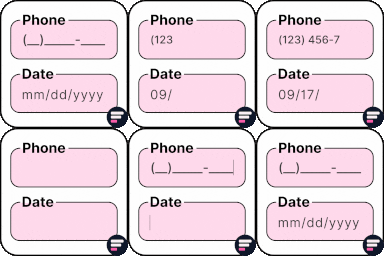
Apply input masks in Elementor form widget fields - phone, date, time, credit card, CPF, CNPJ, CEP & more for valid and error-free entries.
CHOOSE WHAT YOUR WEBSITE NEEDS
Start with the task you need to solve. Compare features, WordPress and PHP requirements, update history and the author’s documentation. Test changes on a private copy and avoid adding several plugins for the same job.
This independent directory displays plugin information on WebFulHost and links to the official source. Packages are not mirrored or installed here. A plugin can include paid extensions or services with separate terms from its author.



