
Toggle Text Widget for Elementor
By Gazi Mohammad Yeasin
A simple Elementor widget that allows you to display summary text with toggleable hidden content.
30+ active installations
- Version
- 1.0.0
- WordPress
- 6.0+
- PHP
- 7.4+
- Updated
- 6 Apr 2026
WORDPRESS RESOURCES
Explore public plugin information from the official WordPress.org directory. Compare what a plugin does, its requirements and update history before adding it to your website.
Explore WordPress hosting →358 matching plugins reported by WordPress.org · Page 4 of 30
Source: WordPress.org
Data refreshed 21 Nov 2026 01:34 UTC
By Gazi Mohammad Yeasin
A simple Elementor widget that allows you to display summary text with toggleable hidden content.
Build a powerful documentation hub with an AI-powered knowledge base, docs, wiki tools, changelogs, FAQ, glossary and an AI chatbot to help users find …

By David Gwyer
Flexible FAQs plugin for WordPress. Create unlimited FAQs easily via a drag and drop interface. Includes predefined themes for your FAQs.
By prismtechstudios
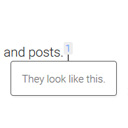
Add inline footnotes to your posts. On desktop, the footnotes will appear as tooltips. On mobile, the footnote will expand beneath the text.

By jgwhite33
Display Yelp business reviews in a fast WordPress slider or grid with a summary badge and review photos. Multi-location support; stored locally.

By jgwhite33
Display Airbnb guest reviews in a fast WordPress slider or grid with a summary badge. Multi-listing support; stored locally on your server.
Elementor addon offering 146+ widgets, AI Builder, Mega Menu, Ready Templates, Page Builder, Slider, Gallery, Post Grid & more.

By WPSight
Flexible WordPress plugin to create professional real estate websites and manage property listings with ease, ideal for agents and portals of any size
Responsive Gutenberg tabs — vertical tabs, tabbed content & WooCommerce product tabs. 100+ patterns, lightweight & accessible.
The compact Testimonial Carousel for Elementor lets you show long text reviews in Pop-Up of Carousel Slider.

By Plugincy
Dynamic AJAX Product Filters allow shoppers to quickly filter WooCommerce products by categories, attributes, prices, and more.

By WPJoli
The best WordPress FAQ plugin: easy & fast single page drag n drop editor, lightweight, no jQuery, block-enabled, schema.org, optimized for SEO.
CHOOSE WHAT YOUR WEBSITE NEEDS
Start with the task you need to solve. Compare features, WordPress and PHP requirements, update history and the author’s documentation. Test changes on a private copy and avoid adding several plugins for the same job.
This independent directory displays plugin information on WebFulHost and links to the official source. Packages are not mirrored or installed here. A plugin can include paid extensions or services with separate terms from its author.