The Most Powerful and Easy To Use Slider for Beaver Builder
★ 5.0/5 (1)400+ active installations
- Version
- 1.5.3
- WordPress
- 4.6+
- Updated
- 23 Jun 2026
WORDPRESS RESOURCES
Explore public plugin information from the official WordPress.org directory. Compare what a plugin does, its requirements and update history before adding it to your website.
Explore WordPress hosting →1,248 matching plugins reported by WordPress.org · Page 4 of 50
Source: WordPress.org
Data refreshed 19 Nov 2026 08:04 UTC
The Most Powerful and Easy To Use Slider for Beaver Builder

By Trusty Plugins
AJAX filter & WooCommerce product filter. Filter posts, CPTs & products by category, taxonomy, attribute & price. Build with drag & drop or AI (MCP).

By jetmonsters
Advanced form builder plugin for Gutenberg. Create forms from the ground up, customize the existing ones, and style them up – all in one editor.
Create customizable products with ease; custom product fields, real-time updates, stackable image layers, and more!

By Cool Plugins
The Events Calendar Elementor widgets help you manage and display an upcoming events list with date, time, venue and event ticket booking details.
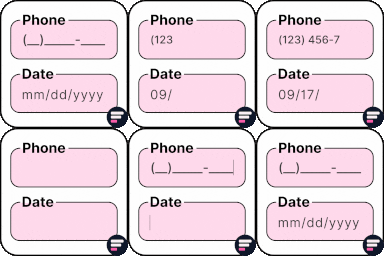
By Rodrigo Bogdanowicz
Apply input masks in Elementor form widget fields - phone, date, time, credit card, CPF, CNPJ, CEP & more for valid and error-free entries.
By UIUX Lab
Uix Page Builder is a design system that it is simple content creation interface.

By WP Titan Labs
Create WooCommerce product tables that are searchable, sortable, filterable and mobile responsive. Help customers find and buy products much faster.
Build membership sites with tiered plans, content restriction, drag-&-drop custom registration & login form builder, and built-in payment system.

By BloomPixel
Free Bricks addons: 20 elements for Bricks Builder, including stylers for Contact Form 7, Gravity Forms, Fluent Forms and Formidable Forms.

Membership & community plugin with user profiles, registration & login, member directories, content restriction, user roles and much more.
Claude, ChatGPT, Gemini or any AI agent runs your site through MCP and automates any task as a workflow. Automation engine built in.
CHOOSE WHAT YOUR WEBSITE NEEDS
Start with the task you need to solve. Compare features, WordPress and PHP requirements, update history and the author’s documentation. Test changes on a private copy and avoid adding several plugins for the same job.
This independent directory displays plugin information on WebFulHost and links to the official source. Packages are not mirrored or installed here. A plugin can include paid extensions or services with separate terms from its author.