

Hide Admin Bar from Non-Admins
By Andrew Lima
Hides the WordPress toolbar (admin bar) for all non-admin users. Simple plugin with no settings to configure.
★ 4.3/5 (30)10,000+ active installations
- Version
- 1.0.2
- WordPress
- 5.2+
- Updated
- 13 Aug 2026
WORDPRESS RESOURCES
Explore public plugin information from the official WordPress.org directory. Compare what a plugin does, its requirements and update history before adding it to your website.
Explore WordPress hosting →6,483 matching plugins reported by WordPress.org · Page 4 of 50
Source: WordPress.org
Data refreshed 22 Nov 2026 09:37 UTC
By Andrew Lima
Hides the WordPress toolbar (admin bar) for all non-admin users. Simple plugin with no settings to configure.
90+ Elementor widgets & addons, 600+ templates, Mega Menu, WooCommerce, Display Conditions. The only Elementor addon AI agents can fully build with.
By Sonal S Sinha
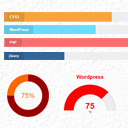
Showcase skillsets that you are good at anywhere on your website using this plugin.
HT Menu is a Elementor page builder addon to create menu and mega menu for WordPress websites. It allows to add Elementor templates to build coloumn a …

By Ninja Team
Multiple notification bars with React-powered customizer, live preview, smart scheduling, and per-bar display rules.

By Catch Plugins
Catch Scroll Progress Bar is a simple, super-light WordPress progress bar plugin to sow the scrolled progress.
Add modules: share buttons, header/footer scripts, disable comments, reading progress, custom fonts, custom login & more in one plugin.

By Sharabindu Bakshi
Add a stylish notification bar, announcement bar, or sticky promo bar to your WordPress site — top or bottom, fully customizable, no coding needed.

By chillcode
Expose menu order column on your dashboard listings.

By campusboy
Simplify your WordPress admin experience effortlessly. Declutter menus, streamline workflow.
Increase order revenue by showing your customers just how close they are to your free shipping threshold.
Add customizable WordPress notification bar to display announcements, promotions, coupons, or news at the top or bottom of your website.
CHOOSE WHAT YOUR WEBSITE NEEDS
Start with the task you need to solve. Compare features, WordPress and PHP requirements, update history and the author’s documentation. Test changes on a private copy and avoid adding several plugins for the same job.
This independent directory displays plugin information on WebFulHost and links to the official source. Packages are not mirrored or installed here. A plugin can include paid extensions or services with separate terms from its author.




