WP Plugin Manager lets you disable plugins on specific pages and posts so they only load where needed. No code required.
★ 4.4/5 (23)3,000+ active installations
- Version
- 1.5.0
- WordPress
- 5.0+
- PHP
- 7.4+
- Updated
- 3 Nov 2026
View plugin details ↗The Best Ajax Live Search and Filter for WordPress. Live suggestions, Custom Post types, Custom fields, Categories, WooCommerce & Elementor support
★ 4.8/5 (266)70,000+ active installations
- Version
- 4.14.7
- WordPress
- 3.5+
- PHP
- 7.4+
- Updated
- 19 Oct 2026
View plugin details ↗The only free pro-grade Elementor filtering system for posts, taxonomies, custom fields, ACF, WooCommerce, WPML & more. Ditch paid limits!
★ 5.0/5 (19)4,000+ active installations
- Version
- 1.9.2
- WordPress
- 6.2+
- PHP
- 7.4+
- Updated
- 25 Oct 2026
View plugin details ↗Simplify order management by filtering WooCommerce orders by any specific product or product category using this plugin
★ 4.7/5 (15)4,000+ active installations
- Version
- 4.1.2
- WordPress
- 3.0.1+
- PHP
- 5.6+
- Updated
- 23 Jun 2026
View plugin details ↗The Elementor Filter plugin allows you to filter every module in Elementor. Just add a few classes and you're done.
★ 5.0/5 (6)600+ active installations
- Version
- 1.0.2
- WordPress
- 4.9+
- PHP
- 7.2+
- Updated
- 21 May 2026
View plugin details ↗Advanced tag management for WordPress with Google Tag Manager
★ 4.5/5 (155)700,000+ active installations
- Version
- 2.1.1
- WordPress
- 6.3+
- PHP
- 8.0+
- Updated
- 5 Nov 2026
View plugin details ↗The main idea of the plugin – make your WordPress site content is filterable and searchable by meta fields and taxonomies on the same time.
★ 4.5/5 (28)900+ active installations
- Version
- 1.4.2
- WordPress
- 5.0+
- PHP
- 7.4+
- Updated
- 24 Oct 2026
View plugin details ↗WordPress SEO plugin with AI SEO metadata, schema, XML sitemap, redirections & Search Console. Privacy-first, white-label SEO. Now AI-ready.
★ 4.8/5 (1,269)300,000+ active installations
- Version
- 10.4
- WordPress
- 6.5+
- PHP
- 7.4+
- Updated
- 29 Oct 2026
View plugin details ↗
By WPMU DEV - Your All-in-One WordPress Platform
Best WordPress form builder plugin. Create contact forms, payment forms & order forms with 1000+ integrations.
★ 4.8/5 (2,153)600,000+ active installations
- Version
- 1.58.6
- WordPress
- 6.4+
- PHP
- 7.4+
- Updated
- 17 Nov 2026
View plugin details ↗Getting too many "plugin updated" or "theme updated" emails since WordPress 5.5? This turns them off.
★ 5.0/5 (6)6,000+ active installations
- Version
- 1.1.5
- WordPress
- 5.5+
- PHP
- 5.3+
- Updated
- 19 Jun 2026
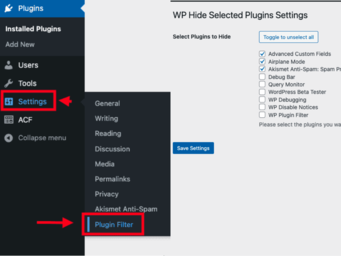
View plugin details ↗WP Plugin Filter lets you easily hide unnecessary plugins from the WordPress admin dashboard, streamlining plugin management.
★ 5.0/5 (1)20+ active installations
- Version
- 1.3.1
- WordPress
- 6.3+
- PHP
- 7.0+
- Updated
- 20 Jun 2026
View plugin details ↗Quickly search and filter categories and taxonomies inside the WordPress admin.
★ 5.0/5 (25)1,000+ active installations
- Version
- 1.7.5
- WordPress
- 6.0+
- PHP
- 7.4+
- Updated
- 29 Oct 2026
View plugin details ↗