

Login Widget With Shortcode
By aviplugins.com
This is a simple login form in the widget. This will allow users to login to the site from frontend.
★ 3.8/5 (29)5,000+ active installations
- Version
- 6.1.3
- WordPress
- 2.0.2+
- Updated
- 11 Jul 2026
WORDPRESS RESOURCES
Explore public plugin information from the official WordPress.org directory. Compare what a plugin does, its requirements and update history before adding it to your website.
Explore WordPress hosting →7,463 matching plugins reported by WordPress.org · Page 4 of 50
Source: WordPress.org
Data refreshed 22 Nov 2026 12:23 UTC
By aviplugins.com
This is a simple login form in the widget. This will allow users to login to the site from frontend.
Enable visitors to submit posts and images from the front-end of your site. Many features including anti-spam security, content restriction, and more.

By Brecht
Easily create filterable responsive grids for your posts, pages or custom post types

By MartinCV
Hide posts or WooCommerce products from the homepage, archives, search, RSS, REST API, sitemaps and SEO tools — per-post control in any editor.

By GrandSlambert
Show posts from any taxonomy in a sidebar or Elementor, with images, excerpts, and style controls.

By marynixie
Related Posts by WPBrigade is The Best Customizable plugin, that nicely displays related posts thumbnails under the post.
Display posts in a responsive grid or slider. Category filter tabs, related posts, Gutenberg block and shortcode. No coding needed.
By Felix W.
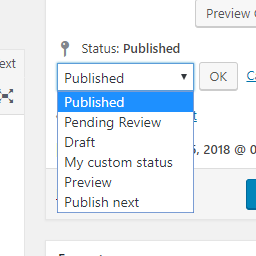
Add new statuses to all post types (posts, pages, products, ...).

By Alexandre Gaboriau
Generate featured images from Bing, GPT Image, Unsplash and more. Automatic, bulk or Gutenberg — based on your post title.

By ZephyrWest
Shows a list of recent posts from a category - with thumbnails, excerpt and a load more button. For posts, pages and the Site Editor.

By codepeople
CodePeople Post Map lets you geotag posts and seamlessly integrate your blog with Google Maps for a smooth, location-aware experience.

By johnnash1975
WP Facebook Like Box Plugin enables you to display the facebook page likes in sidebar widget or popup. Display like button for the posts.
CHOOSE WHAT YOUR WEBSITE NEEDS
Start with the task you need to solve. Compare features, WordPress and PHP requirements, update history and the author’s documentation. Test changes on a private copy and avoid adding several plugins for the same job.
This independent directory displays plugin information on WebFulHost and links to the official source. Packages are not mirrored or installed here. A plugin can include paid extensions or services with separate terms from its author.

