
One Click Close Comments
By Scott Reilly
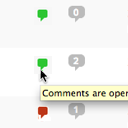
Conveniently close or open comments for a post or page with one click from the admin listing of posts.
★ 4.9/5 (10)5,000+ active installations
- Version
- 3.0
- WordPress
- 4.7+
- Updated
- 17 Apr 2025
WORDPRESS RESOURCES
Explore public plugin information from the official WordPress.org directory. Compare what a plugin does, its requirements and update history before adding it to your website.
Explore WordPress hosting →2,511 matching plugins reported by WordPress.org · Page 4 of 50
Source: WordPress.org
Data refreshed 20 Nov 2026 11:26 UTC
By Scott Reilly
Conveniently close or open comments for a post or page with one click from the admin listing of posts.

By hcaptcha
The strongest CAPTCHA. Switch from reCAPTCHA and Turnstile for free. Works with 60+ integrations: Contact Form 7, Elementor, WooCommerce, Divi, etc.

By Brainstorm Force
Create new sidebar areas and display them conditionally on certain pages. Works with all themes.

By christophrado
Remove unnecessary code, nags and bloat from WordPress core and certain plugins.
Formerly "Custom Facebook Feed". Display completely customizable Facebook feeds of a Facebook page. Supports Facebook oEmbeds.
Add comments, newsletters, and memberships to WordPress sites using Hyvor Talk.

By colorlibplugins
Easily reorder posts, pages, custom post types, and taxonomies with intuitive drag-and-drop sorting in the WordPress admin.

By Foad Adeli
Make your favorite comments stand out with Sticky Comment! Pin your favorite comments on top, so your most valuable feedbacks are always visible.

By praveencrony
Smoothly scroll to top of the page.Change your own back to top image in admin section.

By WebFactory
Add a responsive author box or guest author box with social icons to any post. Great author box for any site!

By Automattic
The official Gravatar plugin, featuring privacy-focused settings, easy profile updates, and customizable Gravatar Profile blocks.

By Vinod Dalvi
Advanced WordPress custom search plugin. Provides Search Form Customizer, WooCommerce Search, AJAX Search & Live Search support!
CHOOSE WHAT YOUR WEBSITE NEEDS
Start with the task you need to solve. Compare features, WordPress and PHP requirements, update history and the author’s documentation. Test changes on a private copy and avoid adding several plugins for the same job.
This independent directory displays plugin information on WebFulHost and links to the official source. Packages are not mirrored or installed here. A plugin can include paid extensions or services with separate terms from its author.

