Map Block
By BoldGrid
Insert a Google Map into the Gutenberg editor.
★ 5.0/5 (1)6,000+ active installations
- Version
- 1.0.1
- WordPress
- 5.0+
- Updated
- 18 Aug 2026
WORDPRESS RESOURCES
Explore public plugin information from the official WordPress.org directory. Compare what a plugin does, its requirements and update history before adding it to your website.
Explore WordPress hosting →5,496 matching plugins reported by WordPress.org · Page 4 of 50
Source: WordPress.org
Data refreshed 19 Nov 2026 20:11 UTC
By BoldGrid
Insert a Google Map into the Gutenberg editor.

By html5maps
Nice looking interactive responsive and mobile-friendly HTML5 Maps incl. US, World and more, with an option to customize view and behavior of the maps

AIOSEO is the WordPress SEO plugin. Boost SEO rankings with AI SEO tools, schema, meta descriptions, XML sitemaps & rank tracking.

By Tijmen Smit
Free store locator with OpenStreetMap maps and no API key. Or use Google Maps, Mapbox or Stadia Maps. Unlimited locations, custom fields and markers.
Show your hikes, rides and runs from GPX, FIT, TCX or KML files on an interactive map with elevation profile, charts and route summary.
Connect ChatGPT, Claude, or another AI agent to your site. Plus backup, malware scan, firewall, stats, CDN, and SEO tools in one plugin.

By Complianz
Publish your cookie banner or notice in minutes. Automatically scan cookies, and create policies to align with GDPR, CCPA, and Google Consent Mode.

By Nexcess
The Events Calendar: #1 calendar plugin for WordPress. Create/manage events (virtual too!) on your site with the free plugin.

By WooCommerce
Native integration with Google that allows merchants to easily display their products across Google’s network.
Privacy friendly, GDPR compliant and self-hosted. Matomo is the #1 Google Analytics alternative that gives you control of your data. Free and secure.
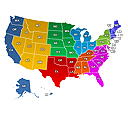
Create engaging Interactive United States Maps in WordPress for free. It's easy to install, simple, and highly customizable.
Build a business directory or member directory on WordPress, complete with a listing manager and directory website builder. No developer needed.
CHOOSE WHAT YOUR WEBSITE NEEDS
Start with the task you need to solve. Compare features, WordPress and PHP requirements, update history and the author’s documentation. Test changes on a private copy and avoid adding several plugins for the same job.
This independent directory displays plugin information on WebFulHost and links to the official source. Packages are not mirrored or installed here. A plugin can include paid extensions or services with separate terms from its author.