JWT Authentication for WP REST API
By tmeister
Extends the WP REST API using JSON Web Tokens Authentication as an authentication method.
★ 4.4/5 (53)50,000+ active installations
- Version
- 1.5.1
- WordPress
- 4.2+
- PHP
- 7.4.0+
- Updated
- 18 Nov 2026
WORDPRESS RESOURCES
Explore public plugin information from the official WordPress.org directory. Compare what a plugin does, its requirements and update history before adding it to your website.
Explore WordPress hosting →10,000 matching plugins reported by WordPress.org · Page 40 of 50
Source: WordPress.org
Data refreshed 22 Nov 2026 15:29 UTC
By tmeister
Extends the WP REST API using JSON Web Tokens Authentication as an authentication method.

By Niels Lange
Points the site logo and site title to any URL you choose instead of the home page, in classic and block themes.

By Darren Cooney
Add infinite scroll, lazy loading, and load more buttons to posts, pages, and WooCommerce products — fast and fully customizable for WordPress.

By Ludwig You
Modular WordPress toolkit for security, performance, SMTP, WebP images, code snippets, redirects, administration and more.

By Matthias Pfefferle
NodeInfo and NodeInfo2 for WordPress!
Secure MCP server. Connect Claude, ChatGPT and Cursor to edit Elementor and Gutenberg pages, WooCommerce, SEO and media.

By knowledgeblog
This plugin enables MathJax (http://www.mathjax.org) functionality for WordPress (http://www.wordpress.org).

SureMail – SMTP and Email Logs Plugin with Amazon SES, Postmark, and Other Providers
Free WebP and AVIF converter. Compress and optimize images on your own server and serve the best format. No API key, no account, no limits.
By Ron Fredericks
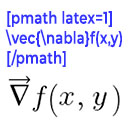
Render mathematical equations in WordPress as PNG images using pmath native syntax or LaTeX input with server-side rendering.
Optimize image sizes, regenerate thumbnails, enable retina, convert to WebP/AVIF, or use cloud optimization. An essential image toolkit.
90+ Elementor widgets & addons, 600+ templates, Mega Menu, WooCommerce, Display Conditions. The only Elementor addon AI agents can fully build with.
CHOOSE WHAT YOUR WEBSITE NEEDS
Start with the task you need to solve. Compare features, WordPress and PHP requirements, update history and the author’s documentation. Test changes on a private copy and avoid adding several plugins for the same job.
This independent directory displays plugin information on WebFulHost and links to the official source. Packages are not mirrored or installed here. A plugin can include paid extensions or services with separate terms from its author.