

Custom social media feeds for Instagram, Facebook, TikTok, & YouTube. Works with Elementor, Beaver Builder, and Gutenberg blocks.
★ 4.7/5 (639)20,000+ active installations
- Version
- 4.4.3
- WordPress
- 5.4+
- PHP
- 7.0+
- Updated
- 5 Sep 2026
WORDPRESS RESOURCES
Explore public plugin information from the official WordPress.org directory. Compare what a plugin does, its requirements and update history before adding it to your website.
Explore WordPress hosting →5,483 matching plugins reported by WordPress.org · Page 41 of 50
Source: WordPress.org
Data refreshed 23 Nov 2026 15:31 UTC
Custom social media feeds for Instagram, Facebook, TikTok, & YouTube. Works with Elementor, Beaver Builder, and Gutenberg blocks.

By Andi Dittrich
All-in-one Syntax Highlighting solution. Full Gutenberg and Classic Editor integration. Graphical theme customizer. Based on EnlighterJS.
50+ ready-made Gutenberg section templates and block patterns. Build landing pages fast with hero, pricing, FAQ and testimonial sections — no coding.

By Aki Hamano
Turn the Custom HTML block into an advanced code editor.
Combine Facebook reviews and recommendations with Google, TripAdvisor and Yelp reviews in a widget, block or shortcode. Build a trusted website!
Show WooCommerce products in carousels, sliders and grids with hover image swap, quick view and fade effects. Works with Gutenberg and Elementor.
Drag and drop Gutenberg table blocks plugin for WordPress block editor to easily create customizable, responsive tables that boost engagement and conv …

By Sayful Islam
Create SEO friendly Image, Logo, Video, Post, WooCommerce Product Carousel, and Slider.

By Bogdan Bendziukov · Pluginarium
Browser-based image compression & WebP—no API keys or quotas. Works on any hosting.

By Alisha Thomas
A modern "2-in-1" save button for the classic AND block editor: save the post and instantly go to your next action.
Appointment scheduling & event booking plugin for WordPress. Let clients self-schedule 24/7, register for events, and pay at booking.
By Felix W.
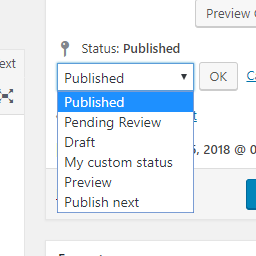
Add new statuses to all post types (posts, pages, products, ...).
CHOOSE WHAT YOUR WEBSITE NEEDS
Start with the task you need to solve. Compare features, WordPress and PHP requirements, update history and the author’s documentation. Test changes on a private copy and avoid adding several plugins for the same job.
This independent directory displays plugin information on WebFulHost and links to the official source. Packages are not mirrored or installed here. A plugin can include paid extensions or services with separate terms from its author.




