The easiest and most useful plugin to display blog posts, pages, or custom posts in beautiful post layouts like post grid, post carousel & post slider
★ 4.5/5 (8)1,000+ active installations
- Version
- 1.8.1
- WordPress
- 4.0+
- Updated
- 19 Aug 2026
WORDPRESS RESOURCES
Explore public plugin information from the official WordPress.org directory. Compare what a plugin does, its requirements and update history before adding it to your website.
Explore WordPress hosting →2,783 matching plugins reported by WordPress.org · Page 41 of 50
Source: WordPress.org
Data refreshed 23 Nov 2026 09:32 UTC
The easiest and most useful plugin to display blog posts, pages, or custom posts in beautiful post layouts like post grid, post carousel & post slider
AI tool to create SEO titles, outlines, drafts and images with a guided workflow, keyword research, and social media automation.
By Ron Fredericks
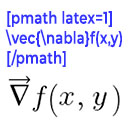
Render mathematical equations in WordPress as PNG images using pmath native syntax or LaTeX input with server-side rendering.

By ziteboard
Embed an infinite, zoomable whiteboard from Ziteboard (https://ziteboard.com) - an online whiteboard with real-time collaboration.
🚀 Multi-Supplier Dropshipping & Affiliate Plugin for WooCommerce Import products from AliExpress, eBay, Amazon, Etsy, and Temu with one click.
A WordPress LMS Plugin to create WordPress Learning Management System. Turn your WordPress to LMS WordPress Website with Courses, Lessons, Quizzes &am …

By Nelio Software
WordPress editorial calendar and social media auto-posting plugin. Schedule posts, share to social networks, and streamline content workflows.
Complete WordPress dark mode with brightness control, contrast adjustment, toggle styles, and auto detection.

By maxfoundry
Maxbuttons is the best and easiest button plugin for WordPress. Within minutes you can create beautiful buttons, share buttons and social icons.
Complete drag & drop page builder for landing pages, dynamic templates & custom designs. Clean code output. SEO-friendly. No coding required.
Testimonials & reviews WordPress plugin for your website. Display responsive website testimonials and customer reviews with ease ⭐

By omnipixy
Compress images without sending them to any third-party server. Compression runs in your own browser, so your photos never leave your site.
CHOOSE WHAT YOUR WEBSITE NEEDS
Start with the task you need to solve. Compare features, WordPress and PHP requirements, update history and the author’s documentation. Test changes on a private copy and avoid adding several plugins for the same job.
This independent directory displays plugin information on WebFulHost and links to the official source. Packages are not mirrored or installed here. A plugin can include paid extensions or services with separate terms from its author.