Customize the WordPress login screen: logo, background, login form & links. Plus your own admin footer text.
★ 4.9/5 (150)7,000+ active installations
- Version
- 5.0
- WordPress
- 5.3+
- PHP
- 5.6+
- Updated
- 9 Nov 2026
View plugin details ↗40+ free Elementor widgets plus extensions: form stylers for Contact Form 7, WPForms and Gravity Forms, Instagram feed, display conditions, templates.
★ 4.8/5 (361)70,000+ active installations
- Version
- 3.2.1
- WordPress
- 6.8+
- PHP
- 7.4+
- Updated
- 16 Nov 2026
View plugin details ↗Add conditional fields to Elementor forms and apply if-else conditional logic to show or hide Elementor form widget fields via dynamic rules.
★ 4.7/5 (32)10,000+ active installations
- Version
- 1.7.8
- WordPress
- 5.0+
- PHP
- 7.2+
- Updated
- 16 Nov 2026
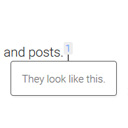
View plugin details ↗Add inline footnotes to your posts. On desktop, the footnotes will appear as tooltips. On mobile, the footnote will expand beneath the text.
★ 4.8/5 (32)6,000+ active installations
- Version
- 1.5.1
- WordPress
- 4.6+
- Updated
- 24 Aug 2026
View plugin details ↗Replace your theme's plain 404 page with one of 20 ready-made designs, edited live in the Customizer. No code, no page builder.
★ 4.7/5 (51)5,000+ active installations
- Version
- 1.1.1
- WordPress
- 6.0+
- PHP
- 7.4+
- Updated
- 29 Sep 2026
View plugin details ↗Custom Order Status Manager for WooCommerce plugin allows you to create, delete and edit order statuses to better control the flow of your orders.
★ 4.7/5 (117)30,000+ active installations
- Version
- 2.1.1
- WordPress
- 4.9+
- PHP
- 7.4+
- Updated
- 18 Nov 2026
View plugin details ↗Build a full website with AI, then edit every block natively in Gutenberg. No new editor to learn, no lock-in.
★ 4.7/5 (55)70,000+ active installations
- Version
- 1.0.16
- WordPress
- 6.6+
- PHP
- 8.1+
- Updated
- 20 Nov 2026
View plugin details ↗The solution for GDPR compliance + more. Get your cookie banner, privacy policy, terms and conditions and handle cookie consent in just one plugin.
★ 4.7/5 (399)200,000+ active installations
- Version
- 3.13.7
- WordPress
- 5.0+
- PHP
- 7.0.0+
- Updated
- 2 Nov 2026
View plugin details ↗Helps you customize WooCommerce without writing any code!
★ 4.6/5 (31)20,000+ active installations
- Version
- 2.9.0
- WordPress
- 5.6+
- PHP
- 7.4+
- Updated
- 2 Mar 2026
View plugin details ↗Show progress bar for amount left for free shipping using our fully customizable WordPress plugin
★ 5.0/5 (26)2,000+ active installations
- Version
- 2.5.6
- WordPress
- 4.7+
- Updated
- 12 Oct 2026
View plugin details ↗Cookieless, privacy-friendly WordPress analytics. Clear graphs and visitor data kept on your own server.
★ 4.1/5 (762)500,000+ active installations
- Version
- 14.16.20
- WordPress
- 6.6+
- PHP
- 7.4+
- Updated
- 20 Nov 2026
View plugin details ↗Easily show or hide any WordPress block. Schedule block visibility. Restrict blocks to specific screen sizes, user roles, post types, and more.
★ 4.9/5 (108)40,000+ active installations
- Version
- 3.8.1
- WordPress
- 6.6+
- PHP
- 7.4+
- Updated
- 18 Sep 2026
View plugin details ↗