
Dynamic Year Block
By Marcio Duarte
A block that always displays the current year in your footer copyright notice.
★ 5.0/5 (8)2,000+ active installations
- Version
- 1.0.1
- WordPress
- 6.4+
- PHP
- 7.4+
- Updated
- 17 Aug 2026
WORDPRESS RESOURCES
Explore public plugin information from the official WordPress.org directory. Compare what a plugin does, its requirements and update history before adding it to your website.
Explore WordPress hosting →10,000 matching plugins reported by WordPress.org · Page 42 of 50
Source: WordPress.org
Data refreshed 22 Nov 2026 15:50 UTC
By Marcio Duarte
A block that always displays the current year in your footer copyright notice.
Free WebP and AVIF converter. Compress and optimize images on your own server and serve the best format. No API key, no account, no limits.
Secure MCP server. Connect Claude, ChatGPT and Cursor to edit Elementor and Gutenberg pages, WooCommerce, SEO and media.
By Ron Fredericks
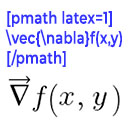
Render mathematical equations in WordPress as PNG images using pmath native syntax or LaTeX input with server-side rendering.
Advanced WooCommerce product search and filter plugin. Customizable search bar, live search suggestions and auto-generated filters for search results.
Free AI chatbot and content generation for WordPress. Train ChatGPT, Claude, Gemini or Grok on your content. WooCommerce ready with RAG.

By GravityKit
Export all Gravity Forms entries to Excel (.xlsx) or CSV via a download button or a secret shareable URL.
Cookie consent banner, script blocking, Google Consent Mode v2, cookie scanner, and consent logs for WordPress.

By Arnan de Gans
Easily manage, and schedule ads on your WordPress site with AdRotate. Support for Google AdSense, Amazon, and custom banners. Start monetizing today!

By Gutentools
Gutentools is a powerful block editor plugin designed for seamless full-site editing.

By Daisuke Yamamoto
Keep image quality while making files smaller for faster pages - just install and you're set, with automatic WebP and AVIF.

By MrDino
Display your Minecraft server status on your WordPress site. Basic mode works without any Minecraft plugin.
CHOOSE WHAT YOUR WEBSITE NEEDS
Start with the task you need to solve. Compare features, WordPress and PHP requirements, update history and the author’s documentation. Test changes on a private copy and avoid adding several plugins for the same job.
This independent directory displays plugin information on WebFulHost and links to the official source. Packages are not mirrored or installed here. A plugin can include paid extensions or services with separate terms from its author.