

Confirmed Shipped for WooCommerce adds an "Order Shipped" status to WooCommerce, improving workflow and keeping customers informed about shipments.
★ 5.0/5 (1)60+ active installations
- Version
- 1.7.0
- WordPress
- 5.0+
- Updated
- 19 Sep 2026
WORDPRESS RESOURCES
Explore public plugin information from the official WordPress.org directory. Compare what a plugin does, its requirements and update history before adding it to your website.
Explore WordPress hosting →10,000 matching plugins reported by WordPress.org · Page 43 of 50
Source: WordPress.org
Data refreshed 25 Nov 2026 00:46 UTC
Confirmed Shipped for WooCommerce adds an "Order Shipped" status to WooCommerce, improving workflow and keeping customers informed about shipments.

By Phi Phan
A simple breadcrumb trail block that supports JSON-LD structured data and is compatible with Woocommerce

By Justin Kruit
Adds a new 'Font Awesome Icon' field to the popular Advanced Custom Fields plugin.

By D3 LOGICS
Add unlimited custom CSS and custom JavaScript to WordPress from the admin panel, with a live code editor, autocomplete, and minified output.

By Rustaurius
Restaurant reviews made easy. Add and display reviews on your restaurant site using SEO friendly schema markup.

By Denra.com
Shortcode to show any current, past, and future date or time. Display this, previous, or next year, month, day, etc.

By Azizul Hasan
Free text to speech with browser voices + premium AI voices from Google, OpenAI & ElevenLabs. Add an audio player to any WordPress post.
The AI chatbot, AI agent and MCP server for WordPress. Connect OpenAI, Claude, Gemini and more to chat, write, search and automate your site.

By Element Invader
Ready to use Elementor Addon Elements like Menu, Forms, Maps, Newsletter with many styling options
By Felix W.
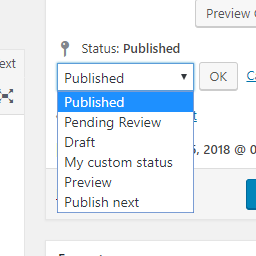
Add new statuses to all post types (posts, pages, products, ...).

By David Stone
Ajaxify Comments speeds up your comment section, allowing for lazy loading comments, instant comment posting, and seamless success and error messages.

By David Artiss
Code Embed provides a very easy and efficient way to embed code (JavaScript, CSS and HTML) in your posts and pages.
CHOOSE WHAT YOUR WEBSITE NEEDS
Start with the task you need to solve. Compare features, WordPress and PHP requirements, update history and the author’s documentation. Test changes on a private copy and avoid adding several plugins for the same job.
This independent directory displays plugin information on WebFulHost and links to the official source. Packages are not mirrored or installed here. A plugin can include paid extensions or services with separate terms from its author.
