

White label WordPress admin, admin menu editor, login page customizer, admin dark mode, media library folders, admin columns.
★ 4.3/5 (109)6,000+ active installations
- Version
- 4.3.5
- WordPress
- 5.0+
- PHP
- 7.4+
- Updated
- 11 Nov 2026
WORDPRESS RESOURCES
Explore public plugin information from the official WordPress.org directory. Compare what a plugin does, its requirements and update history before adding it to your website.
Explore WordPress hosting →10,000 matching plugins reported by WordPress.org · Page 43 of 50
Source: WordPress.org
Data refreshed 22 Nov 2026 05:15 UTC
White label WordPress admin, admin menu editor, login page customizer, admin dark mode, media library folders, admin columns.

By Yannick Lefebvre
The purpose of this plugin is to add the ability to output a list of link categories and a complete list of links with notes and descriptions.

By vjinfotech
Complete Import & Export solution for Posts, Pages, Custom Posts, Users, Taxonomies, Comments, and more.
Advanced Post Block lets you add dynamic post grids, lists, sliders, and tickers. Filter content by category, tag, author, or custom post type.
Maximize your WordPress site's potential with our versatile HTML5 Audio Player plugin. Seamlessly play .mp3, .wav, .ogg, and more audio files.
AI-powered WordPress directory plugin to build a business directory or classified ads site: maps, reviews, radius search, paid listings. No coding.
By Denis Botić
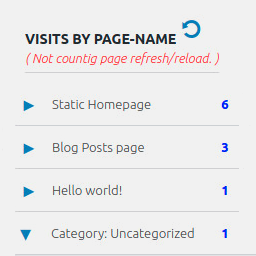
Display number of visits for each page in admin dashboard and browser developer-tool/console. Doesn't count page refresh as a new visit...

By HT Plugins
The HT Slider is an Elementor slider plugin that enables you to add advanced sliders to your WordPress website.

By WooCommerce
Integrate your WooCommerce store with Reddit Ads to track conversions and export products for advertising.

By ExpressTech Systems
Mobile menu & hamburger menu builder for WordPress. Accessible, keyboard-friendly and works with any theme or page builder. 150+ options, no code.
The best WooCommerce checkout manager. Edit, remove or add checkout fields. Customize WooCommerce checkout with this checkout field customizer.

Delete, disable, and clean all comments in one click. Easily manage, bulk delete, or completely disable comments across your entire WordPress site.
CHOOSE WHAT YOUR WEBSITE NEEDS
Start with the task you need to solve. Compare features, WordPress and PHP requirements, update history and the author’s documentation. Test changes on a private copy and avoid adding several plugins for the same job.
This independent directory displays plugin information on WebFulHost and links to the official source. Packages are not mirrored or installed here. A plugin can include paid extensions or services with separate terms from its author.



