
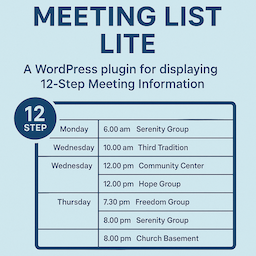
Meeting List Lite
By pjaudiomv
This is a WordPress plugin for displaying 12-Step Meeting Information.
0+ active installations
- Version
- 1.2.4
- WordPress
- 5.3+
- PHP
- 8.0+
- Updated
- 29 Dec 2025
WORDPRESS RESOURCES
Explore public plugin information from the official WordPress.org directory. Compare what a plugin does, its requirements and update history before adding it to your website.
Explore WordPress hosting →1,351 matching plugins reported by WordPress.org · Page 43 of 50
Source: WordPress.org
Data refreshed 22 Nov 2026 12:47 UTC
By pjaudiomv
This is a WordPress plugin for displaying 12-Step Meeting Information.

By Devang Vachheta
Self-hosted live chat for WordPress: agent inbox, WhatsApp & social contact buttons, canned replies, analytics. No subscription, your data.

By thessleysecurity
Modular WordPress security hardening — IP/country blocking, request inspection, file integrity, malware scanning, and real-time alerting.

By Respacio real estate CRM
Import and Sync properties from the Respacio CRM.

By Gaurav Tiwari
Page caching, unused CSS removal, and Cloudflare Free edge caching that never caches a cart or checkout. Everything runs on your own server.

By tscholene
Quote-based WordPress booking: customers request, you send a custom quote, they accept. For service businesses with variable pricing.

By Dwarpal
Firewall, malware scan, login security, and SEO hack protection for WordPress.

By Yohann-YAOTW
Import a full design system (colors, typography, buttons, effects) into Elementor, the block editor, or CSS variables. No code needed.

By Blogient
Connect your Blogient account to auto-publish AI-generated, SEO-friendly posts to WordPress as native posts with images and SEO meta.

By GetSiteCalendar Lite
The friendly events calendar for WordPress. For community groups, clubs, churches and small venues — free RSVP, ICS feed, mobile-ready.

By Rede Piabanha
Extend Yoast SEO with precise Schema.org types, Google-aware fields and optional real visitor ratings in its existing JSON-LD graph.

By xerotact
Shared-hosting security with WAF logging, opt-in enforcement, malware scanning, login protection, hardening, backups, and audit tools.
CHOOSE WHAT YOUR WEBSITE NEEDS
Start with the task you need to solve. Compare features, WordPress and PHP requirements, update history and the author’s documentation. Test changes on a private copy and avoid adding several plugins for the same job.
This independent directory displays plugin information on WebFulHost and links to the official source. Packages are not mirrored or installed here. A plugin can include paid extensions or services with separate terms from its author.