

Take full control of the Storefront sidebar and footer copyright — no code required.
100+ active installations
- Version
- 1.1.1
- WordPress
- 4.4+
- PHP
- 5.5+
- Updated
- 10 Mar 2026
WORDPRESS RESOURCES
Explore public plugin information from the official WordPress.org directory. Compare what a plugin does, its requirements and update history before adding it to your website.
Explore WordPress hosting →9,635 matching plugins reported by WordPress.org · Page 43 of 50
Source: WordPress.org
Data refreshed 27 Nov 2026 01:51 UTC
Take full control of the Storefront sidebar and footer copyright — no code required.
Show the BuddyPress activity stream, members directory and groups directory on any post or page, with shortcodes or Elementor widgets.

By Hamid Alinia
Passwordless OTP login for WordPress. Login or register with phone number via SMS or Firebase. Compatible with WooCommerce. GDPR-compliant.

By gerritvanaaken
A fast, flexible and responsive podcast player with chapters, transcripts and customizable themes.

By Yudiz Solutions Ltd.
Create and display widgets anywhere on your site with WP Anywhere Widgets—simple, flexible, and code-free!
By ThemeHunk
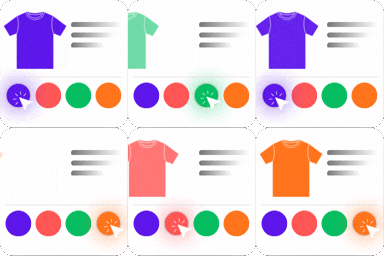
Variation Swatches for WooCommerce plugin will replace default swatches to professionally styled and colourful swatches.

By Link Nacional
Link Invoice Payment is an extension for WooCommerce, designed to simplify online billing. Whether for one-time or subscriptions (recurring invoices)

By itthinx
A Widget toolbox that adds visibility management and helps to control where widgets, sidebars and content are shown efficiently.

By Pdfcrowd Dev Team
Add a PDF download button to WordPress in minutes. Visitors can save pages or posts as PDF with one click.
A fully featured, easy-to-use documentation plugin with AI chat, search, FAQs, and quizzes. Build beautiful knowledge bases, docs, and wikis.

By Alisha Thomas
A modern "2-in-1" save button for the classic AND block editor: save the post and instantly go to your next action.

By Yeasin
A fast, cache-friendly age verification popup for WordPress and WooCommerce with Yes / No buttons or a Day / Month / Year date-of-birth check.
CHOOSE WHAT YOUR WEBSITE NEEDS
Start with the task you need to solve. Compare features, WordPress and PHP requirements, update history and the author’s documentation. Test changes on a private copy and avoid adding several plugins for the same job.
This independent directory displays plugin information on WebFulHost and links to the official source. Packages are not mirrored or installed here. A plugin can include paid extensions or services with separate terms from its author.

