WooCommerce tiered pricing & quantity discount plugin: bulk pricing tables, wholesale discounts, live updates, "You Save" labels.
★ 5.0/5 (3)100+ active installations
- Version
- 1.0.3
- WordPress
- 6.0+
- PHP
- 7.4+
- Updated
- 25 Oct 2026
View plugin details ↗Create a loyalty points and rewards program in WordPress with points, rewards, referrals, VIP tiers, and AI-assisted setup.
★ 5.0/5 (1)40+ active installations
- Version
- 1.0.5
- WordPress
- 6.4+
- PHP
- 8.0+
- Updated
- 9 Nov 2026
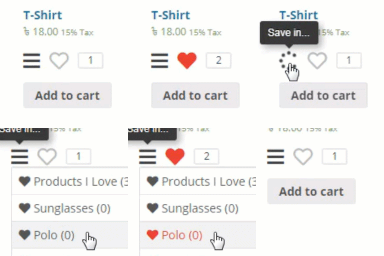
View plugin details ↗Add wishlist feature to your WooCommerce product or any post types.
★ 3.8/5 (13)300+ active installations
- Version
- 1.0.46
- WordPress
- 3.8+
- Updated
- 8 Jun 2026
View plugin details ↗
By Octolize Shipping Plugins
Offer FedEx shipping for WooCommerce with real-time rates via FedEx API. Show live rates at checkout based on weight and addresses.
★ 4.4/5 (27)2,000+ active installations
- Version
- 4.6.1
- WordPress
- 6.4+
- PHP
- 7.4+
- Updated
- 27 Oct 2026
View plugin details ↗An availability calendar for WooCommerce Bookings: a calendar block and shortcode, the spots left on each slot, sold-out slots and the next free day.
★ 5.0/5 (4)300+ active installations
- Version
- 1.2.1
- WordPress
- 4.8+
- PHP
- 7.3+
- Updated
- 26 Nov 2026
View plugin details ↗This plugin automatically tags WooCommerce orders based on custom rules to improve order management and efficiently manage order processing.
★ 5.0/5 (2)200+ active installations
- Version
- 1.0.72
- WordPress
- 5.0+
- PHP
- 7.4+
- Updated
- 16 Nov 2026
View plugin details ↗Create multiple menu items at once or quick delete menu item with or without all subitems
★ 5.0/5 (9)1,000+ active installations
- Version
- 9.6
- WordPress
- 4.0+
- Updated
- 19 Nov 2025
View plugin details ↗Simple plugin that allow you add call phone button to your wordpress site
★ 5.0/5 (1)700+ active installations
- Version
- 2.1.2
- WordPress
- 5.0+
- PHP
- 5.2.4+
- Updated
- 25 Nov 2026
View plugin details ↗Colour, image and label swatches for WooCommerce variations, a photo gallery for each colour, and one-click ordering of several sizes.
★ 4.0/5 (12)100+ active installations
- Version
- 2.2.2
- WordPress
- 6.0+
- PHP
- 7.4+
- Updated
- 15 Nov 2026
View plugin details ↗Professional Inventory Management. Demand Forecasting. Automated Replenishment. All in one powerful tool.
★ 4.7/5 (16)100+ active installations
- Version
- 2.10.0
- WordPress
- 6.0+
- PHP
- 8.0+
- Updated
- 6 Nov 2026
View plugin details ↗A block for embedding a beautiful audio player
★ 5.0/5 (10)2,000+ active installations
- Version
- 1.6.5
- WordPress
- 6.5+
- PHP
- 7.1+
- Updated
- 28 Nov 2026
View plugin details ↗A free shipping plugin for US merchants to print discounted shipping labels and compare live label rates directly from your WooCommerce dashboard.
★ 2.0/5 (18)70,000+ active installations
- Version
- 2.5.2
- WordPress
- 7.0+
- PHP
- 7.4+
- Updated
- 18 Nov 2026
View plugin details ↗