
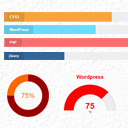
SKT Skill Bar
By Sonal S Sinha
Showcase skillsets that you are good at anywhere on your website using this plugin.
★ 4.1/5 (14)1,000+ active installations
- Version
- 3.1
- WordPress
- 5.0+
- PHP
- 7.4+
- Updated
- 29 Jun 2026
WORDPRESS RESOURCES
Explore public plugin information from the official WordPress.org directory. Compare what a plugin does, its requirements and update history before adding it to your website.
Explore WordPress hosting →10,000 matching plugins reported by WordPress.org · Page 45 of 50
Source: WordPress.org
Data refreshed 22 Nov 2026 20:50 UTC
By Sonal S Sinha
Showcase skillsets that you are good at anywhere on your website using this plugin.

By Brecht
Easily create filterable responsive grids for your posts, pages or custom post types

By Dotstore
Allows store owners to restrict payment methods based on the various conditions!

By preetindersodhi
This plugin is a collection of various WP tweaks.

By StudioPress
A collection of content blocks, sections, & full-page layouts for the block editor.

By Mike Jolley
Easily add an ajax-enhanced login widget to your WordPress site sidebar.
The Ultimate Coming Soon Page, Maintenance Mode & Under Construction plugin — powered by the Gutenberg Block Builder. Create stunning Landing Page …

By Barn2 Plugins
Discover the easy way to add extra tabs to your WooCommerce product pages.
Social sharing plugin adding social buttons.

By WordPress.org
Plugin Check is a WordPress.org tool which provides checks to help plugins meet the directory requirements and follow various best practices.

By Passionate Programmer Peter
Write, test, and organize PHP, JavaScript, CSS, and HTML code blocks from the WordPress dashboard.

By EDGARROJAS
The best form builder for small business and freelancers, Make complex forms easily. Lifetime license.
CHOOSE WHAT YOUR WEBSITE NEEDS
Start with the task you need to solve. Compare features, WordPress and PHP requirements, update history and the author’s documentation. Test changes on a private copy and avoid adding several plugins for the same job.
This independent directory displays plugin information on WebFulHost and links to the official source. Packages are not mirrored or installed here. A plugin can include paid extensions or services with separate terms from its author.

