Boost WooCommerce sales with the Rearrange Products for WooCommerce plugin. Easily reorder products with a simple drag-and-drop tool!
★ 4.6/5 (58)20,000+ active installations
- Version
- 6.1.0
- WordPress
- 6.6+
- PHP
- 7.4.0+
- Updated
- 29 Oct 2026
View plugin details ↗A powerful WordPress plugin for full URL control. Set custom permalinks, auto-redirects, and use dynamic tags for ideal site structure and SEO.
★ 4.1/5 (116)100,000+ active installations
- Version
- 3.3.3
- WordPress
- 5.9+
- PHP
- 7.4+
- Updated
- 13 Oct 2026
View plugin details ↗Show client, partner and sponsor logos in a responsive logo slider, carousel, ticker or grid. Shortcode builder with live preview, no coding.
★ 4.7/5 (252)30,000+ active installations
- Version
- 3.9.2
- WordPress
- 6.0+
- PHP
- 7.4+
- Updated
- 7 Nov 2026
View plugin details ↗Automatically logout idle user sessions, with logout redirections and concurrent limit logins all in one place.
★ 4.8/5 (106)20,000+ active installations
- Version
- 3.6.4
- WordPress
- 6.6+
- PHP
- 7.4+
- Updated
- 1 Oct 2026
View plugin details ↗Translate your WordPress site with a polished Google Translate language switcher for instant visitor translation.
★ 4.4/5 (12)3,000+ active installations
- Version
- 2.3.0
- WordPress
- 6.5+
- PHP
- 7.4+
- Updated
- 7 Oct 2026
View plugin details ↗Hide author archive URL of WordPress.
★ 5.0/5 (1)600+ active installations
- Version
- 1.3.0
- WordPress
- 6.6+
- PHP
- 7.4+
- Updated
- 16 Oct 2026
View plugin details ↗Accordion , FAQ & Docs builder with Drag and Drop features. Helpie Accordion FAQ plugin works with Helpie Knowledge Base , Woocommerce & Elementor
★ 4.5/5 (80)8,000+ active installations
- Version
- 1.53
- WordPress
- 6.5+
- PHP
- 7.4+
- Updated
- 20 Nov 2026
View plugin details ↗Auto-track every WooCommerce shipment, give customers a branded tracking page, and notify them by email and SMS until delivery.
★ 4.7/5 (52)5,000+ active installations
- Version
- 2.0.9
- WordPress
- 6.2+
- PHP
- 7.4+
- Updated
- 24 Nov 2026
View plugin details ↗Custom user profiles plugin ❤ with paid memberships, groups, communities, content restriction, user registration, messaging, WooCommerce memberships, …
★ 4.6/5 (237)5,000+ active installations
- Version
- 6.0.0.7
- WordPress
- 3.5+
- PHP
- 7.4+
- Updated
- 17 Nov 2026
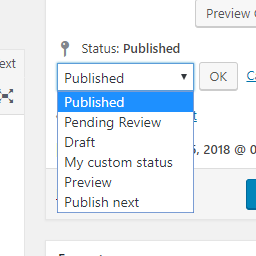
View plugin details ↗Add new statuses to all post types (posts, pages, products, ...).
★ 4.5/5 (11)1,000+ active installations
- Version
- 1.1.1
- WordPress
- 5.0+
- PHP
- 7.2+
- Updated
- 1 Sep 2026
View plugin details ↗Disable unused WordPress features and remove bloat. 120 switches for performance, security and WooCommerce — pure PHP, no .htaccess, no upsell.
★ 5.0/5 (6)200+ active installations
- Version
- 1.14.2
- WordPress
- 5.0+
- PHP
- 7.4+
- Updated
- 19 Nov 2026
View plugin details ↗Import Word (.docx) and Markdown files as WordPress posts, pages or custom post types. Images, headings and tables kept. No copy-paste.
★ 5.0/5 (4)200+ active installations
- Version
- 1.5.0
- WordPress
- 6.0+
- PHP
- 8.0+
- Updated
- 21 Nov 2026
View plugin details ↗