

Video Popup plugin lets you create unlimited, responsive Video Lightbox and Popup for YouTube, Vimeo, MP4 & WebM on click or page load.
★ 4.5/5 (43)10,000+ active installations
- Version
- 2.0.4
- WordPress
- 5.8+
- PHP
- 7.4+
- Updated
- 21 Aug 2026
WORDPRESS RESOURCES
Explore public plugin information from the official WordPress.org directory. Compare what a plugin does, its requirements and update history before adding it to your website.
Explore WordPress hosting →10,000 matching plugins reported by WordPress.org · Page 45 of 50
Source: WordPress.org
Data refreshed 28 Nov 2026 07:29 UTC
Video Popup plugin lets you create unlimited, responsive Video Lightbox and Popup for YouTube, Vimeo, MP4 & WebM on click or page load.

By Nexcess
Event Tickets allows your visitors to RSVP and buy tickets to events on your site. Also works seamlessly with The Events Calendar.

By jp-secure
Adds WordPress login and admin protections, including CAPTCHA, login lock, login alerts, renamed login URLs, and SiteGuard WAF tuning support.

By Rock Lobster Inc.
A trustworthy message storage plugin for Contact Form 7.

By George Pattichis
Improve your SEO and keep your link juice by automatically redirecting all 404 errors to any page/post/url. User friendly options and log feature.

By ShortPixel
Replace any image or file in the Media Library by uploading a new one. Remove backgrounds and upscale images with AI, one by one or in bulk.
By Felix W.
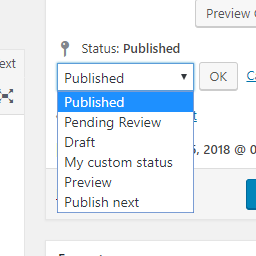
Add new statuses to all post types (posts, pages, products, ...).

By Deepen Bajracharya
Automatically logout idle user sessions, with logout redirections and concurrent limit logins all in one place.

By revmakx
Install this plugin on unlimited sites and manage them all from a central dashboard. This plugin communicates with your InfiniteWP Admin Panel.

By wp.insider
Simple membership plugin adds membership functionality to your site. Protect members only content using content protection easily.

By WP All Solution
Automatically complete WooCommerce orders after successful payment. Supports virtual, digital, downloadable products.
Protect content from copying, scraping and inspection with JS blocking, keyword cloaking, noise injection, optional encryption or lazy loading.
CHOOSE WHAT YOUR WEBSITE NEEDS
Start with the task you need to solve. Compare features, WordPress and PHP requirements, update history and the author’s documentation. Test changes on a private copy and avoid adding several plugins for the same job.
This independent directory displays plugin information on WebFulHost and links to the official source. Packages are not mirrored or installed here. A plugin can include paid extensions or services with separate terms from its author.
