

Add lightweight social share buttons to WordPress posts and pages. Gutenberg-native, fully customizable, with shortcode support and share themes.
★ 4.3/5 (3)2,000+ active installations
- Version
- 2.5.0
- WordPress
- 6.5+
- PHP
- 7.4+
- Updated
- 18 Nov 2026
WORDPRESS RESOURCES
Explore public plugin information from the official WordPress.org directory. Compare what a plugin does, its requirements and update history before adding it to your website.
Explore WordPress hosting →3,092 matching plugins reported by WordPress.org · Page 45 of 50
Source: WordPress.org
Data refreshed 22 Nov 2026 05:12 UTC
Add lightweight social share buttons to WordPress posts and pages. Gutenberg-native, fully customizable, with shortcode support and share themes.

By Shipon Karmakar
Lightweight social share buttons for blog posts and WooCommerce products — sortable networks, colors, shortcode builder, Gutenberg & Elementor.

By Listings for Appfolio
This plugin gets your Appfolio property listings and display them in an interactive way rather than using iframe and gives you styling freedom.
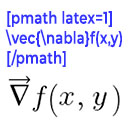
By Ron Fredericks
Render mathematical equations in WordPress as PNG images using pmath native syntax or LaTeX input with server-side rendering.

By Realwebcare
A powerful and lightweight WordPress plugin for creating responsive, filterable image or portfolio galleries using [shortcode].

By add-ons.org
Professional AJAX Drag & Drop file upload for WooCommerce product pages. Allow customers to upload images, documents, and files instantly.
The fastest drag & drop photo gallery plugin. Create stunning image galleries, albums, video galleries & lightbox displays in minutes — no coding!
Addon Elements for Elementor comes with 40+ widgets and extensions to extend the power of Elementor Page Builder.

By Nazmul Sabuz
Upload files into WordPress media library from front-end with drag-and-drop functionality and customizable options.
Embed a responsive live radio streaming player in WordPress – IceCast, Shoutcast, RadioCo, RadioJar & more via shortcode or Gutenberg block.

By AddonsPress
Convert English dates to Nepali and vice versa, including WordPress post dates. Includes widgets, shortcodes, and custom functions.

The easiest and fastest Email Marketing, Newsletter, Marketing Automation Plugin & CRM Solution for WordPress
CHOOSE WHAT YOUR WEBSITE NEEDS
Start with the task you need to solve. Compare features, WordPress and PHP requirements, update history and the author’s documentation. Test changes on a private copy and avoid adding several plugins for the same job.
This independent directory displays plugin information on WebFulHost and links to the official source. Packages are not mirrored or installed here. A plugin can include paid extensions or services with separate terms from its author.


