Embed any external content on a Page, Post, or Custom Post Type without the need to use complicated domain forwarding or domain masks.
★ 5.0/5 (9)900+ active installations
- Version
- 1.8.5.6
- WordPress
- 4.7+
- PHP
- 5.4+
- Updated
- 3 Sep 2026
View plugin details ↗Password Protect Pages, Posts & Content in WordPress
★ 4.2/5 (60)10,000+ active installations
- Version
- 4.3.26
- WordPress
- 6.5+
- PHP
- 7.2+
- Updated
- 23 Nov 2026
View plugin details ↗Monitor your WP site the right way with most important stats like Database, PHP details, PHP Memory, RAM Usage, CPU load, Server Uptime & more.
★ 4.8/5 (110)9,000+ active installations
- Version
- 1.9.1
- WordPress
- 5.0+
- PHP
- 7.4.0+
- Updated
- 21 Jul 2026
View plugin details ↗Core Web Vitals (CWV) is the new ranking factor
★ 3.9/5 (15)900+ active installations
- Version
- 1.0.32
- WordPress
- 4.7.1+
- Updated
- 21 Sep 2026
View plugin details ↗Grade your WordPress hosting setup in seconds — CPU, RAM, disk, PHP, database, caching and WP settings. Zero configuration.
★ 5.0/5 (1)40+ active installations
- Version
- 1.0.9
- WordPress
- 5.9+
- PHP
- 7.4+
- Updated
- 3 Jul 2026
View plugin details ↗Display WordPress posts in beautiful grid, list, slider, and filter layouts. Works with Gutenberg, Elementor, Divi, and Shortcodes.
★ 4.8/5 (265)100,000+ active installations
- Version
- 7.9.11
- WordPress
- 4.5+
- PHP
- 7.4+
- Updated
- 11 Nov 2026
View plugin details ↗Password protect your WordPress site with one password. Control access, whitelist trusted IPs, and monitor password activity.
★ 4.4/5 (143)300,000+ active installations
- Version
- 2.8.7
- WordPress
- 6.5+
- PHP
- 7.4+
- Updated
- 18 Nov 2026
View plugin details ↗One plugin to optimize, backup, secure, and speed up your WordPress site. Replaces 4+ plugins.
★ 5.0/5 (4)30+ active installations
- Version
- 1.5.1
- WordPress
- 5.5+
- PHP
- 7.4+
- Updated
- 16 Sep 2026
View plugin details ↗Speed up your WordPress site with one-click optimizations like Page Cache, Critical CSS, and Image CDN to improve Core Web Vitals.
★ 4.7/5 (613)200,000+ active installations
- Version
- 4.9.0
- WordPress
- 7.0+
- PHP
- 7.4+
- Updated
- 19 Nov 2026
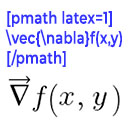
View plugin details ↗Render mathematical equations in WordPress as PNG images using pmath native syntax or LaTeX input with server-side rendering.
★ 4.2/5 (5)300+ active installations
- Version
- 3.0.5
- WordPress
- 5.0+
- PHP
- 7.2+
- Updated
- 9 May 2026
View plugin details ↗Modern WordPress plugin for filtering categories from home page with performance optimization and security enhancements.
★ 5.0/5 (1)200+ active installations
- Version
- 2.1.1
- WordPress
- 6.0+
- PHP
- 8.3+
- Updated
- 6 Sep 2026
View plugin details ↗Compress, resize and convert images to WebP or AVIF. Bulk-optimize your Media Library in the background and restore any original with one click.
★ 5.0/5 (2)200+ active installations
- Version
- 2.0.0
- WordPress
- 6.5+
- PHP
- 7.4+
- Updated
- 12 Nov 2026
View plugin details ↗