Discount woocommerce plugin / Bulk discounts for woocommerce / dynamic pricing rule like product discount, product category discounts etc..
★ 4.8/5 (5)90+ active installations
- Version
- 1.9.39.49
- WordPress
- 3.0.1+
- Updated
- 13 Nov 2026
View plugin details ↗WordPress CRM to manage contacts, leads, deals, invoices, products, client Portal, companies and collect payment via WooCommerce from one dashboard.
★ 5.0/5 (4)300+ active installations
- Version
- 1.4.1
- WordPress
- 6.5+
- PHP
- 8.2+
- Updated
- 12 Nov 2026
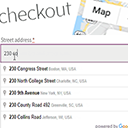
View plugin details ↗Improve your WooCommerce checkout flow with Google Places address autocomplete, geocoding, and location picker tools. Supports Classic Checkout and Ch …
★ 4.5/5 (11)1,000+ active installations
- Version
- 1.2.2
- WordPress
- 4.5+
- PHP
- 5.6+
- Updated
- 27 Nov 2025
View plugin details ↗
By Jonny White (from Ticket Tailor)
Sell event tickets online via your WordPress website. Ticket Tailor is an easy event ticketing & event registration system.
★ 4.3/5 (46)4,000+ active installations
- Version
- 1.14
- WordPress
- 2.8+
- Updated
- 20 Oct 2026
View plugin details ↗The Customer Notes for WooCommerce plugin allows store owners to add specific notes for each customer, which are then displayed on the Edit Order page …
★ 5.0/5 (3)200+ active installations
- Version
- 1.3.1
- WordPress
- 5.0+
- Updated
- 22 Aug 2026
View plugin details ↗WordPress can't send email reliably on its own. Send through your SMTP provider, log every message, get alerts when sending breaks. Free, no upsell.
★ 5.0/5 (1)200+ active installations
- Version
- 2.7.5
- WordPress
- 6.0+
- PHP
- 7.4+
- Updated
- 26 Aug 2026
View plugin details ↗Area-based delivery fees for WooCommerce. Bilingual (AR/EN), classic and block checkout, free-delivery thresholds.
10+ active installations
- Version
- 1.3.1
- WordPress
- 5.8+
- PHP
- 7.4+
- Updated
- 5 Nov 2026
View plugin details ↗Convenient and Friendly parcel delivery service
★ 3.0/5 (4)60+ active installations
- Version
- 5.0.5
- WordPress
- 5.3+
- PHP
- 7.4+
- Updated
- 11 May 2026
View plugin details ↗Effortlessly set up WordPress themes with WPelemento Importer. One-click demo imports, Elementor compatibility, and support for diverse themes.
7,000+ active installations
- Version
- 0.7.3
- WordPress
- 5.2+
- PHP
- 7.2+
- Updated
- 13 Nov 2026
View plugin details ↗Secure and customize your WordPress login page with a custom login URL, 2FA, CAPTCHA, and more.
★ 3.6/5 (35)60,000+ active installations
- Version
- 2.5.2
- WordPress
- 6.2+
- PHP
- 7.4+
- Updated
- 11 Nov 2026
View plugin details ↗Integrate any Content Delivery Network (CDN) into WordPress.
★ 5.0/5 (3)20+ active installations
- Version
- 1.0.1
- WordPress
- 4.4+
- Updated
- 19 Jul 2026
View plugin details ↗Send Contact Form 7 submissions to any webhook endpoint with optional Bearer token authentication.
★ 4.0/5 (3)60+ active installations
- Version
- 1.1.6
- WordPress
- 6.0+
- PHP
- 7.4+
- Updated
- 24 Oct 2026
View plugin details ↗