

Create custom cursors, animated cursor effects, and animated background effects in WordPress with a live preview. No coding required.
★ 4.5/5 (4)3,000+ active installations
- Version
- 2.5.4
- WordPress
- 6.0+
- PHP
- 7.4+
- Updated
- 22 Nov 2026
WORDPRESS RESOURCES
Explore public plugin information from the official WordPress.org directory. Compare what a plugin does, its requirements and update history before adding it to your website.
Explore WordPress hosting →10,000 matching plugins reported by WordPress.org · Page 47 of 50
Source: WordPress.org
Data refreshed 24 Nov 2026 23:32 UTC
Create custom cursors, animated cursor effects, and animated background effects in WordPress with a live preview. No coding required.

By ramon fincken
Auto deletes expires (prunes) posts after a certain amount of time. On a per category basis (single category, or all at once.

By hcaptcha
The strongest CAPTCHA. Switch from reCAPTCHA and Turnstile for free. Works with 60+ integrations: Contact Form 7, Elementor, WooCommerce, Divi, etc.

By Scott Nelle
Custom Related Products for WooCommerce lets you choose which products should show in the related products area on a product detail page.

By Northern Beaches Websites
WP LinkedIn Auto Publish automatically publishes posts, custom posts and pages to your LinkedIn profile and/or company pages.
Add a YouTube, Vimeo or Rumble video popup to WordPress. Lightweight, privacy-friendly lightbox that works with any page builder.
Optimize and tweak WordPress by disable unused features. Improve performance, SEO and security using Clearfy — super easy, fast and zero code.

By ProteusThemes
Allows you to create custom sidebars. Replace sidebars for specific posts and pages.
By Felix W.
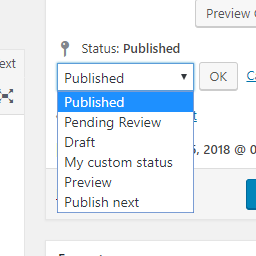
Add new statuses to all post types (posts, pages, products, ...).

By Ivijan-Stefan Stipic
Quickly search and filter categories and taxonomies inside the WordPress admin.

By wpdevart
Duplicate Page or Post is an great tool that allow to duplicate pages and posts. Now you can do it in one click.

By Timo Reith
Notify on every post change: Flexible rules, custom placeholders and support for all post types and taxonomies.
CHOOSE WHAT YOUR WEBSITE NEEDS
Start with the task you need to solve. Compare features, WordPress and PHP requirements, update history and the author’s documentation. Test changes on a private copy and avoid adding several plugins for the same job.
This independent directory displays plugin information on WebFulHost and links to the official source. Packages are not mirrored or installed here. A plugin can include paid extensions or services with separate terms from its author.

