Easy Bootstrap Shortcode enable you to add bootstrap 3.0.3 styles in your pages, post and custom post in simplest manner.
★ 4.0/5 (50)6,000+ active installations
- Version
- 5.0.2
- WordPress
- 6.5+
- PHP
- 7.4+
- Updated
- 25 Aug 2026
View plugin details ↗The first and only PDF drag and drop builder for WPForms.
★ 4.0/5 (8)800+ active installations
- Version
- 1.2.150
- WordPress
- 3.3+
- Updated
- 17 Aug 2026
View plugin details ↗FAQ and accordion block for Gutenberg. Bulk paste a whole FAQ at once — add, reorder and edit every question inside one block.
★ 5.0/5 (2)100+ active installations
- Version
- 0.1.10
- WordPress
- 6.5+
- PHP
- 7.4+
- Updated
- 17 Oct 2026
View plugin details ↗Connect EmailOctopus with WordPress using Block Editor forms, Elementor Pro and a dedicated WooCommerce integration.
★ 5.0/5 (4)200+ active installations
- Version
- 1.1.1
- WordPress
- 6.0+
- PHP
- 8.0+
- Updated
- 4 Sep 2026
View plugin details ↗Allows only one product in the cart at a time. Clears previous items when a new product is added. For logged-in users only.
★ 5.0/5 (9)500+ active installations
- Version
- 1.2
- WordPress
- 4.0+
- PHP
- 5.6+
- Updated
- 18 Jul 2025
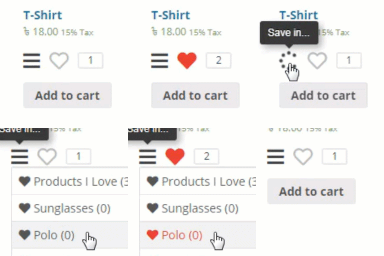
View plugin details ↗Add wishlist feature to your WooCommerce product or any post types.
★ 3.8/5 (13)300+ active installations
- Version
- 1.0.46
- WordPress
- 3.8+
- Updated
- 8 Jun 2026
View plugin details ↗Create responsive tabs inside your posts, pages or custom post content by adding simple shortcodes inside the post editor.
★ 4.9/5 (144)10,000+ active installations
- Version
- 1.4.1
- WordPress
- 4.9+
- PHP
- 5.6+
- Updated
- 17 Aug 2025
View plugin details ↗Display an expandable area with advanced options in WPCasa property search form.
★ 3.0/5 (2)600+ active installations
- Version
- 1.1.1
- WordPress
- 6.2+
- PHP
- 7.2+
- Updated
- 18 Aug 2026
View plugin details ↗User role editing for WordPress. Manage user roles, control capabilities and permissions, and restrict admin access for any role.
★ 4.7/5 (144)90,000+ active installations
- Version
- 2.54.0
- WordPress
- 5.5+
- PHP
- 8.2+
- Updated
- 18 Nov 2026
View plugin details ↗Chessgame Shizzle is a nice way to integrate chessgames into your WordPress website. Ideal for chess clubs, your chess blog, or any chess related webs …
★ 4.7/5 (3)100+ active installations
- Version
- 1.3.4
- WordPress
- 4.1+
- PHP
- 7.0+
- Updated
- 28 Sep 2026
View plugin details ↗ePoll is a free poll and voting tool. Create custom, responsive online elections, contests, and surveys with images and videos on your site.
★ 3.9/5 (24)1,000+ active installations
- Version
- 3.9
- WordPress
- 5.0+
- PHP
- 7.4+
- Updated
- 14 Jul 2026
View plugin details ↗Increase traffic and engagement with fast, responsive social share buttons for WordPress. No paid upgrades required.
★ 3.5/5 (26)10,000+ active installations
- Version
- 2.3.13
- WordPress
- 5.5+
- Updated
- 7 Oct 2026
View plugin details ↗