WP REST Menus
By skapator
Add menus endpoints to WP REST API
★ 5.0/5 (4)90+ active installations
- Version
- 1.0.4
- WordPress
- 5.0+
- PHP
- 5.6+
- Updated
- 17 Feb 2022
WORDPRESS RESOURCES
Explore public plugin information from the official WordPress.org directory. Compare what a plugin does, its requirements and update history before adding it to your website.
Explore WordPress hosting →748 matching plugins reported by WordPress.org · Page 48 of 50
Source: WordPress.org
Data refreshed 24 Nov 2026 03:22 UTC
By skapator
Add menus endpoints to WP REST API
WooCommerce multi-currency switcher with automatic exchange rates, GeoIP detection, currency links and role-based access. Lightweight and fast.

By Flex Plugins
Force HTTPS, update site URLs, and add security headers. Supports reverse proxies, certificate checks, and lock-out recovery.

By Skipperblogs
Track your boat around the globe with Iridium, AIS, InReach, PredictWind, SPOT, Startlink, etc, and display an interactive map on your website.
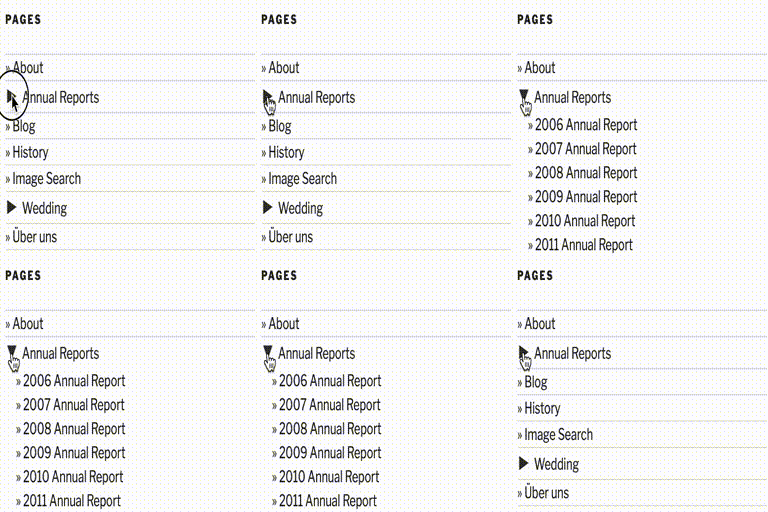
By robfelty
This plugin uses Javascript to dynamically expand or collapsable the set of pages for each parent page.

By Venutius
Adds BuddyPress status options for posts - Group posts (public, site members only and group only, Members Only, Followers, Following and Friends only …

By ContextLift
Smart Internal Linking Plugin for WordPress – Automatically build internal links, reduce click depth, audit broken links with 1-click remediation, and …

By derethor
Create easy related posts blocks with a simple shortcode. This plugin is light, very easy to use and designed for SEO.

By mark456321
AI-powered content refresh tool. Keep your WordPress posts accurate and ranking with Claude, OpenAI, or Gemini. Unlimited refreshes — free, forever.

By Automattic
Enhances the editing experience in the Block Editor.

By Alex
An easy-to-use interface to aide with Consent and Privacy compliance.

By Michel - xiligroup dev
xili-language lets you create and manage multilingual WP site in several languages with yours or most famous localizable themes. Ready for CMS design.
CHOOSE WHAT YOUR WEBSITE NEEDS
Start with the task you need to solve. Compare features, WordPress and PHP requirements, update history and the author’s documentation. Test changes on a private copy and avoid adding several plugins for the same job.
This independent directory displays plugin information on WebFulHost and links to the official source. Packages are not mirrored or installed here. A plugin can include paid extensions or services with separate terms from its author.