

Force Default Variant for WooCommerce
By HappyKite
Removes the Standard WooCommerce variant default of 'Choose an Option' and replaces it with a variant.
★ 4.8/5 (21)3,000+ active installations
- Version
- 1.8.3
- WordPress
- 4.2+
- Updated
- 5 Sep 2025
WORDPRESS RESOURCES
Explore public plugin information from the official WordPress.org directory. Compare what a plugin does, its requirements and update history before adding it to your website.
Explore WordPress hosting →3,023 matching plugins reported by WordPress.org · Page 48 of 50
Source: WordPress.org
Data refreshed 22 Nov 2026 16:12 UTC
By HappyKite
Removes the Standard WooCommerce variant default of 'Choose an Option' and replaces it with a variant.
Conditional Discount Rules For WooCommerce Checkout Plugin will help you to create and manage complex discount rules based on your requirement.

By ynproduct
Yektanet Ecommerce plugin to integrate with yektanet advertising system

High-converting popup campaigns with PopupKit – advanced triggers, A/B testing, spin-to-win, multistep popups & 270+ popup templates for WordPress
By PickPlugins
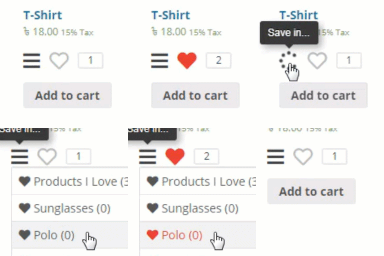
Add wishlist feature to your WooCommerce product or any post types.

By PNX Software
This plugin is developed by an official PayPal partner and verified by PayPal, providing a secure and reliable payment solution.

By payssion
Official Payssion module for WordPress WooCommerce.

By Contractor Commerce
This plugin integrates Contractor Commerce™ into your WordPress site.

By Sonal S Sinha
Recover abandoned cart for WooCommerce easily. Increase sales by recovering your lost shopping cart by customers.

By silverplugins217
Automatically offer free gift products in WooCommerce based on product quantity, category, or cart total. Boost conversions and delight customers with …

By WP Swings
Create WooCommerce Upsells in One Click, Increase Sales with Related Products, Post Purchase Upsell, Cross Sell, Order Bump and Frequently Bought.

By iConvert
🚀 A powerful and dynamic WordPress popup toolkit to grow your email list, retain customers, and boost conversions.
CHOOSE WHAT YOUR WEBSITE NEEDS
Start with the task you need to solve. Compare features, WordPress and PHP requirements, update history and the author’s documentation. Test changes on a private copy and avoid adding several plugins for the same job.
This independent directory displays plugin information on WebFulHost and links to the official source. Packages are not mirrored or installed here. A plugin can include paid extensions or services with separate terms from its author.
