The easiest, safest way to connect Claude, ChatGPT and other AI assistants to WordPress, built on WordPress's own MCP Adapter.
★ 5.0/5 (3)60+ active installations
- Version
- 1.6.0
- WordPress
- 7.1+
- PHP
- 8.2+
- Updated
- 27 Nov 2026
View plugin details ↗Changelog, release notes, product roadmap and feature request board for WordPress. Beautiful visual timelines, no coding needed.
★ 5.0/5 (5)200+ active installations
- Version
- 1.12.1
- WordPress
- 6.0+
- PHP
- 7.4+
- Updated
- 13 Oct 2026
View plugin details ↗Increase user engagement by incorporating sticky buttons that highlight relevant information on your website.
★ 3.7/5 (6)10,000+ active installations
- Version
- 4.3.6
- WordPress
- 5.5+
- PHP
- 7.4+
- Updated
- 25 Aug 2026
View plugin details ↗Broadcast from a browser, OBS or IP camera to live channel pages on your WordPress site, with chat, access rules and scheduling.
★ 2.7/5 (14)300+ active installations
- Version
- 8.0.0.2
- WordPress
- 6.9+
- PHP
- 8.2+
- Updated
- 28 Nov 2026
View plugin details ↗Help customers preview artwork on their walls before buying with a lightweight, builder-friendly room visualization tool.
★ 5.0/5 (1)30+ active installations
- Version
- 3.0.5
- WordPress
- 5.0+
- PHP
- 7.4+
- Updated
- 19 Oct 2026
View plugin details ↗FunnelKit Cart adds a beautiful sliding cart to your WooCommerce store. Let the buyers add items, edit quantity and add upsells on the side cart.
★ 5.0/5 (112)30,000+ active installations
- Version
- 1.9.1.3
- WordPress
- 5.0+
- PHP
- 7.0+
- Updated
- 20 Nov 2026
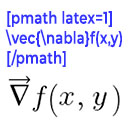
View plugin details ↗Render mathematical equations in WordPress as PNG images using pmath native syntax or LaTeX input with server-side rendering.
★ 4.2/5 (5)300+ active installations
- Version
- 3.0.5
- WordPress
- 5.0+
- PHP
- 7.2+
- Updated
- 9 May 2026
View plugin details ↗Free AI chatbot for WordPress with RAG, live agent handoff, and WooCommerce order tracking. Real-time streaming, 6 AI providers, no monthly fees.
★ 5.0/5 (1)20+ active installations
- Version
- 2.3.0
- WordPress
- 5.9+
- PHP
- 7.4+
- Updated
- 21 Nov 2026
View plugin details ↗Track Orders for WooCommerce – WooCommerce Shipping Plugin with delivery notifications, tracking templates, and live updates.
★ 3.7/5 (3)200+ active installations
- Version
- 1.2.8
- WordPress
- 6.7.0+
- PHP
- 7.4+
- Updated
- 20 Nov 2026
View plugin details ↗Add Telegram login to your WordPress site. Visitors sign in with their existing Telegram account — no new password to remember.
10+ active installations
- Version
- 0.1.5
- WordPress
- 6.8+
- PHP
- 8.1+
- Updated
- 2 Jun 2026
View plugin details ↗Beautiful floating chat buttons for WhatsApp, Telegram, Instagram, Facebook, phone and email. WhatsApp popup, business hours, live preview.
★ 5.0/5 (4)10+ active installations
- Version
- 3.0.3
- WordPress
- 5.6+
- PHP
- 7.0+
- Updated
- 26 Nov 2026
View plugin details ↗Properly leveraging your contact lists isn’t sending out a single email to the entire list asking for work — instead you need to build business relati …
★ 5.0/5 (7)30+ active installations
- Version
- 3.2.4
- WordPress
- 5.5+
- Updated
- 18 Aug 2026
View plugin details ↗