

Sawir Media Folders
By Ricardo Sawir
Fast, unlimited folders for the WordPress media library with drag & drop.
10+ active installations
- Version
- 1.1.2
- WordPress
- 5.8+
- PHP
- 7.4+
- Updated
- 17 Nov 2026
WORDPRESS RESOURCES
Explore public plugin information from the official WordPress.org directory. Compare what a plugin does, its requirements and update history before adding it to your website.
Explore WordPress hosting →2,514 matching plugins reported by WordPress.org · Page 49 of 50
Source: WordPress.org
Data refreshed 28 Nov 2026 23:05 UTC
By Ricardo Sawir
Fast, unlimited folders for the WordPress media library with drag & drop.

By GhozyLab
Web Icons plugin gives you scalable vector icons that can instantly be customized. More than 2.5k icons available.

By Andrei Strekozov
Build a football league or club website in WordPress: fixtures, results, automatic standings, squads and player statistics.

By AVAR Solutions
Find unused images and duplicate files, clean your Media Library, compress images and create WebP/AVIF — with a restorable trash.

By rbplugins
Image Widget - most simple and fast way to create image widget to your sidebar

By Subrata Sarkar
Create image sizes that survive theme changes, convert and serve WebP, and see where every image in your Media Library is used.

By Ilja Becker
Free all-in-one toolkit: content folders, duplicate posts, custom login URL, maintenance mode, media replace, classic editor & Elementor extensions.

By opcodespace
With this plugin you simply export and import page, post and custom post. This plugin supports ACF fields.

By Devang Vachheta
Optimize images and videos on your server, then reclaim disk space: find unused media, duplicate files and leftover thumbnails.
By David Lingren
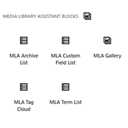
Provides Gutenberg blocks for all shortcodes provided by the popular Media Library Assistant.

By Debuggers Studio
Marquee Addons is a smooth video, text, image, and testimonial marquee carousel loop plugin for Elementor on WordPress
Organize the WordPress Media Library into drag-and-drop folders with a fast React tree, color labels, and a REST API.
CHOOSE WHAT YOUR WEBSITE NEEDS
Start with the task you need to solve. Compare features, WordPress and PHP requirements, update history and the author’s documentation. Test changes on a private copy and avoid adding several plugins for the same job.
This independent directory displays plugin information on WebFulHost and links to the official source. Packages are not mirrored or installed here. A plugin can include paid extensions or services with separate terms from its author.
